1250 lines
50 KiB
Markdown
1250 lines
50 KiB
Markdown
# baoyu-skills
|
||
|
||
English | [中文](./README.zh.md)
|
||
|
||
Skills shared by Baoyu for improving daily work efficiency with Claude Code.
|
||
|
||
## Prerequisites
|
||
|
||
- Node.js environment installed
|
||
- Ability to run `npx bun` commands
|
||
|
||
## Installation
|
||
|
||
### Quick Install (Recommended)
|
||
|
||
```bash
|
||
npx skills add jimliu/baoyu-skills
|
||
```
|
||
|
||
### Publish to ClawHub / OpenClaw
|
||
|
||
This repository now supports publishing each `skills/baoyu-*` directory as an individual ClawHub skill.
|
||
|
||
```bash
|
||
# Preview what would be published
|
||
./scripts/sync-clawhub.sh --dry-run
|
||
|
||
# Publish all changed skills from ./skills
|
||
./scripts/sync-clawhub.sh --all
|
||
```
|
||
|
||
ClawHub installs skills individually, not as one marketplace bundle. After publishing, users can install specific skills such as:
|
||
|
||
```bash
|
||
clawhub install baoyu-imagine
|
||
clawhub install baoyu-markdown-to-html
|
||
```
|
||
|
||
Publishing to ClawHub releases the published skill under `MIT-0`, per ClawHub's registry rules.
|
||
|
||
### Register as Plugin Marketplace
|
||
|
||
Run the following command in Claude Code:
|
||
|
||
```bash
|
||
/plugin marketplace add JimLiu/baoyu-skills
|
||
```
|
||
|
||
### Install Skills
|
||
|
||
**Option 1: Via Browse UI**
|
||
|
||
1. Select **Browse and install plugins**
|
||
2. Select **baoyu-skills**
|
||
3. Select the **baoyu-skills** plugin
|
||
4. Select **Install now**
|
||
|
||
**Option 2: Direct Install**
|
||
|
||
```bash
|
||
# Install the marketplace's single plugin
|
||
/plugin install baoyu-skills@baoyu-skills
|
||
```
|
||
|
||
**Option 3: Ask the Agent**
|
||
|
||
Simply tell Claude Code:
|
||
|
||
> Please install Skills from github.com/JimLiu/baoyu-skills
|
||
|
||
### Available Plugin
|
||
|
||
The marketplace now exposes a single plugin so each skill is registered exactly once.
|
||
|
||
| Plugin | Description | Includes |
|
||
|--------|-------------|----------|
|
||
| **baoyu-skills** | Content generation, AI backends, and utility tools for daily work efficiency | All skills in this repository, organized below as Content Skills, AI Generation Skills, and Utility Skills |
|
||
|
||
## Update Skills
|
||
|
||
To update skills to the latest version:
|
||
|
||
1. Run `/plugin` in Claude Code
|
||
2. Switch to **Marketplaces** tab (use arrow keys or Tab)
|
||
3. Select **baoyu-skills**
|
||
4. Choose **Update marketplace**
|
||
|
||
You can also **Enable auto-update** to get the latest versions automatically.
|
||
|
||

|
||
|
||
## Available Skills
|
||
|
||
Skills are organized into three categories:
|
||
|
||
### Content Skills
|
||
|
||
Content generation and publishing skills.
|
||
|
||
#### baoyu-xhs-images
|
||
|
||
Xiaohongshu image card series generator. Breaks down content into 1-10 cartoon-style image cards with **Style × Layout** system and optional palette override.
|
||
|
||
```bash
|
||
# Auto-select style and layout
|
||
/baoyu-xhs-images posts/ai-future/article.md
|
||
|
||
# Specify style
|
||
/baoyu-xhs-images posts/ai-future/article.md --style notion
|
||
|
||
# Specify layout
|
||
/baoyu-xhs-images posts/ai-future/article.md --layout dense
|
||
|
||
# Combine style and layout
|
||
/baoyu-xhs-images posts/ai-future/article.md --style notion --layout list
|
||
|
||
# Override palette
|
||
/baoyu-xhs-images posts/ai-future/article.md --style notion --palette macaron
|
||
|
||
# Direct content input
|
||
/baoyu-xhs-images 今日星座运势
|
||
|
||
# Non-interactive (skip all confirmations, for scheduled tasks)
|
||
/baoyu-xhs-images posts/ai-future/article.md --yes
|
||
/baoyu-xhs-images posts/ai-future/article.md --yes --preset knowledge-card
|
||
```
|
||
|
||
**Styles** (visual aesthetics): `cute` (default), `fresh`, `warm`, `bold`, `minimal`, `retro`, `pop`, `notion`, `chalkboard`, `study-notes`, `screen-print`, `sketch-notes`
|
||
|
||
**Palettes** (optional color override): `macaron`, `warm`, `neon`
|
||
|
||
**Style Previews**:
|
||
|
||
| | | |
|
||
|:---:|:---:|:---:|
|
||
|  |  |  |
|
||
| cute | fresh | warm |
|
||
|  |  |  |
|
||
| bold | minimal | retro |
|
||
|  |  |  |
|
||
| pop | notion | chalkboard |
|
||
|
||
**Layouts** (information density):
|
||
| Layout | Density | Best for |
|
||
|--------|---------|----------|
|
||
| `sparse` | 1-2 pts | Covers, quotes |
|
||
| `balanced` | 3-4 pts | Regular content |
|
||
| `dense` | 5-8 pts | Knowledge cards, cheat sheets |
|
||
| `list` | 4-7 items | Checklists, rankings |
|
||
| `comparison` | 2 sides | Before/after, pros/cons |
|
||
| `flow` | 3-6 steps | Processes, timelines |
|
||
|
||
**Layout Previews**:
|
||
|
||
| | | |
|
||
|:---:|:---:|:---:|
|
||
|  |  |  |
|
||
| sparse | balanced | dense |
|
||
|  |  |  |
|
||
| list | comparison | flow |
|
||
|
||
#### baoyu-infographic
|
||
|
||
Generate professional infographics with 21 layout types and 21 visual styles. Analyzes content, recommends layout×style combinations, and generates publication-ready infographics.
|
||
|
||
```bash
|
||
# Auto-recommend combinations based on content
|
||
/baoyu-infographic path/to/content.md
|
||
|
||
# Specify layout
|
||
/baoyu-infographic path/to/content.md --layout pyramid
|
||
|
||
# Specify style (default: craft-handmade)
|
||
/baoyu-infographic path/to/content.md --style technical-schematic
|
||
|
||
# Specify both
|
||
/baoyu-infographic path/to/content.md --layout funnel --style corporate-memphis
|
||
|
||
# With aspect ratio (named preset or custom W:H)
|
||
/baoyu-infographic path/to/content.md --aspect portrait
|
||
/baoyu-infographic path/to/content.md --aspect 3:4
|
||
```
|
||
|
||
**Options**:
|
||
| Option | Description |
|
||
|--------|-------------|
|
||
| `--layout <name>` | Information layout (20 options) |
|
||
| `--style <name>` | Visual style (17 options, default: craft-handmade) |
|
||
| `--aspect <ratio>` | Named: landscape (16:9), portrait (9:16), square (1:1). Custom: any W:H ratio (e.g., 3:4, 4:3, 2.35:1) |
|
||
| `--lang <code>` | Output language (en, zh, ja, etc.) |
|
||
|
||
**Layouts** (information structure):
|
||
|
||
| Layout | Best For |
|
||
|--------|----------|
|
||
| `bridge` | Problem-solution, gap-crossing |
|
||
| `circular-flow` | Cycles, recurring processes |
|
||
| `comparison-table` | Multi-factor comparisons |
|
||
| `do-dont` | Correct vs incorrect practices |
|
||
| `equation` | Formula breakdown, input-output |
|
||
| `feature-list` | Product features, bullet points |
|
||
| `fishbone` | Root cause analysis |
|
||
| `funnel` | Conversion processes, filtering |
|
||
| `grid-cards` | Multiple topics, overview |
|
||
| `iceberg` | Surface vs hidden aspects |
|
||
| `journey-path` | Customer journey, milestones |
|
||
| `layers-stack` | Technology stack, layers |
|
||
| `mind-map` | Brainstorming, idea mapping |
|
||
| `nested-circles` | Levels of influence, scope |
|
||
| `priority-quadrants` | Eisenhower matrix, 2x2 |
|
||
| `pyramid` | Hierarchy, Maslow's needs |
|
||
| `scale-balance` | Pros vs cons, weighing |
|
||
| `timeline-horizontal` | History, chronological events |
|
||
| `tree-hierarchy` | Org charts, taxonomy |
|
||
| `venn` | Overlapping concepts |
|
||
|
||
**Layout Previews**:
|
||
|
||
| | | |
|
||
|:---:|:---:|:---:|
|
||
|  |  |  |
|
||
| bridge | circular-flow | comparison-table |
|
||
|  |  |  |
|
||
| do-dont | equation | feature-list |
|
||
|  |  |  |
|
||
| fishbone | funnel | grid-cards |
|
||
|  |  |  |
|
||
| iceberg | journey-path | layers-stack |
|
||
|  |  |  |
|
||
| mind-map | nested-circles | priority-quadrants |
|
||
|  |  |  |
|
||
| pyramid | scale-balance | timeline-horizontal |
|
||
|  |  | |
|
||
| tree-hierarchy | venn | |
|
||
|
||
**Styles** (visual aesthetics):
|
||
|
||
| Style | Description |
|
||
|-------|-------------|
|
||
| `craft-handmade` (Default) | Hand-drawn illustration, paper craft aesthetic |
|
||
| `claymation` | 3D clay figures, playful stop-motion |
|
||
| `kawaii` | Japanese cute, big eyes, pastel colors |
|
||
| `storybook-watercolor` | Soft painted illustrations, whimsical |
|
||
| `chalkboard` | Colorful chalk on black board |
|
||
| `cyberpunk-neon` | Neon glow on dark, futuristic |
|
||
| `bold-graphic` | Comic style, halftone dots, high contrast |
|
||
| `aged-academia` | Vintage science, sepia sketches |
|
||
| `corporate-memphis` | Flat vector people, vibrant fills |
|
||
| `technical-schematic` | Blueprint, isometric 3D, engineering |
|
||
| `origami` | Folded paper forms, geometric |
|
||
| `pixel-art` | Retro 8-bit, nostalgic gaming |
|
||
| `ui-wireframe` | Grayscale boxes, interface mockup |
|
||
| `subway-map` | Transit diagram, colored lines |
|
||
| `ikea-manual` | Minimal line art, assembly style |
|
||
| `knolling` | Organized flat-lay, top-down |
|
||
| `lego-brick` | Toy brick construction, playful |
|
||
|
||
**Style Previews**:
|
||
|
||
| | | |
|
||
|:---:|:---:|:---:|
|
||
|  |  |  |
|
||
| craft-handmade | claymation | kawaii |
|
||
|  |  |  |
|
||
| storybook-watercolor | chalkboard | cyberpunk-neon |
|
||
|  |  |  |
|
||
| bold-graphic | aged-academia | corporate-memphis |
|
||
|  |  |  |
|
||
| technical-schematic | origami | pixel-art |
|
||
|  |  |  |
|
||
| ui-wireframe | subway-map | ikea-manual |
|
||
|  |  | |
|
||
| knolling | lego-brick | |
|
||
|
||
#### baoyu-diagram
|
||
|
||
Generate publication-ready SVG diagrams — flowcharts, structural/architecture diagrams, and illustrative intuition diagrams. Claude writes real SVG code directly following a cohesive design system. Output is a single self-contained `.svg` file with embedded styles and auto dark-mode, ready to embed in articles, WeChat posts, slides, Notion, and docs.
|
||
|
||
```bash
|
||
# Auto-route on the verb in the prompt
|
||
/baoyu-diagram "how JWT authentication works"
|
||
|
||
# Force a specific type
|
||
/baoyu-diagram "Kubernetes architecture" --type structural
|
||
/baoyu-diagram "how attention works" --type illustrative
|
||
/baoyu-diagram "CI/CD pipeline" --type flowchart
|
||
|
||
# From a markdown source file
|
||
/baoyu-diagram path/to/content.md
|
||
|
||
# Language and output path
|
||
/baoyu-diagram "微服务架构" --lang zh
|
||
/baoyu-diagram "build pipeline" --out docs/build-pipeline.svg
|
||
```
|
||
|
||
**Options**:
|
||
| Option | Description |
|
||
|--------|-------------|
|
||
| `--type <name>` | `flowchart`, `structural`, `illustrative`, `auto` (default) |
|
||
| `--lang <code>` | Output language (en, zh, ja, ...) |
|
||
| `--out <path>` | Output file path (default: `diagram/{slug}/diagram.svg`) |
|
||
|
||
**Diagram types**:
|
||
|
||
| Type | Reader need | Verbs that trigger it |
|
||
|------|-------------|------------------------|
|
||
| `flowchart` | Walk me through the steps in order | walk through, steps, process, lifecycle, workflow, state machine |
|
||
| `structural` | Show me what's inside what, how it's organised | architecture, components, topology, layout, what's inside |
|
||
| `illustrative` | Give me the intuition — draw the mechanism | how does X work, explain X, intuition for, why does X do Y |
|
||
|
||
Not an image-generation skill — no LLM image model is called. Claude writes the SVG by hand with hand-computed layout math, so every diagram honors the design system. Embedded `<style>` block with `@media (prefers-color-scheme: dark)` means the same file renders correctly in both light and dark mode anywhere it's embedded.
|
||
|
||
#### baoyu-cover-image
|
||
|
||
Generate cover images for articles with 5 dimensions: Type × Palette × Rendering × Text × Mood. Combines 11 color palettes with 7 rendering styles for 77 unique combinations.
|
||
|
||
```bash
|
||
# Auto-select all dimensions based on content
|
||
/baoyu-cover-image path/to/article.md
|
||
|
||
# Quick mode: skip confirmation, use auto-selection
|
||
/baoyu-cover-image path/to/article.md --quick
|
||
|
||
# Specify dimensions (5D system)
|
||
/baoyu-cover-image path/to/article.md --type conceptual --palette cool --rendering digital
|
||
/baoyu-cover-image path/to/article.md --text title-subtitle --mood bold
|
||
|
||
# Style presets (backward-compatible shorthand)
|
||
/baoyu-cover-image path/to/article.md --style blueprint
|
||
|
||
# Specify aspect ratio (default: 16:9)
|
||
/baoyu-cover-image path/to/article.md --aspect 2.35:1
|
||
|
||
# Visual only (no title text)
|
||
/baoyu-cover-image path/to/article.md --no-title
|
||
```
|
||
|
||
**Five Dimensions**:
|
||
- **Type**: `hero`, `conceptual`, `typography`, `metaphor`, `scene`, `minimal`
|
||
- **Palette**: `warm`, `elegant`, `cool`, `dark`, `earth`, `vivid`, `pastel`, `mono`, `retro`, `duotone`, `macaron`
|
||
- **Rendering**: `flat-vector`, `hand-drawn`, `painterly`, `digital`, `pixel`, `chalk`, `screen-print`
|
||
- **Text**: `none`, `title-only` (default), `title-subtitle`, `text-rich`
|
||
- **Mood**: `subtle`, `balanced` (default), `bold`
|
||
|
||
#### baoyu-slide-deck
|
||
|
||
Generate professional slide deck images from content. Creates comprehensive outlines with style instructions, then generates individual slide images.
|
||
|
||
```bash
|
||
# From markdown file
|
||
/baoyu-slide-deck path/to/article.md
|
||
|
||
# With style and audience
|
||
/baoyu-slide-deck path/to/article.md --style corporate
|
||
/baoyu-slide-deck path/to/article.md --audience executives
|
||
|
||
# Target slide count
|
||
/baoyu-slide-deck path/to/article.md --slides 15
|
||
|
||
# Outline only (no image generation)
|
||
/baoyu-slide-deck path/to/article.md --outline-only
|
||
|
||
# With language
|
||
/baoyu-slide-deck path/to/article.md --lang zh
|
||
```
|
||
|
||
**Options**:
|
||
|
||
| Option | Description |
|
||
|--------|-------------|
|
||
| `--style <name>` | Visual style: preset name or `custom` |
|
||
| `--audience <type>` | Target: beginners, intermediate, experts, executives, general |
|
||
| `--lang <code>` | Output language (en, zh, ja, etc.) |
|
||
| `--slides <number>` | Target slide count (8-25 recommended, max 30) |
|
||
| `--outline-only` | Generate outline only, skip images |
|
||
| `--prompts-only` | Generate outline + prompts, skip images |
|
||
| `--images-only` | Generate images from existing prompts |
|
||
| `--regenerate <N>` | Regenerate specific slide(s): `3` or `2,5,8` |
|
||
|
||
**Style System**:
|
||
|
||
Styles are built from 4 dimensions: **Texture** × **Mood** × **Typography** × **Density**
|
||
|
||
| Dimension | Options |
|
||
|-----------|---------|
|
||
| Texture | clean, grid, organic, pixel, paper |
|
||
| Mood | professional, warm, cool, vibrant, dark, neutral |
|
||
| Typography | geometric, humanist, handwritten, editorial, technical |
|
||
| Density | minimal, balanced, dense |
|
||
|
||
**Presets** (pre-configured dimension combinations):
|
||
|
||
| Preset | Dimensions | Best For |
|
||
|--------|------------|----------|
|
||
| `blueprint` (default) | grid + cool + technical + balanced | Architecture, system design |
|
||
| `chalkboard` | organic + warm + handwritten + balanced | Education, tutorials |
|
||
| `corporate` | clean + professional + geometric + balanced | Investor decks, proposals |
|
||
| `minimal` | clean + neutral + geometric + minimal | Executive briefings |
|
||
| `sketch-notes` | organic + warm + handwritten + balanced | Educational, tutorials |
|
||
| `watercolor` | organic + warm + humanist + minimal | Lifestyle, wellness |
|
||
| `dark-atmospheric` | clean + dark + editorial + balanced | Entertainment, gaming |
|
||
| `notion` | clean + neutral + geometric + dense | Product demos, SaaS |
|
||
| `bold-editorial` | clean + vibrant + editorial + balanced | Product launches, keynotes |
|
||
| `editorial-infographic` | clean + cool + editorial + dense | Tech explainers, research |
|
||
| `fantasy-animation` | organic + vibrant + handwritten + minimal | Educational storytelling |
|
||
| `intuition-machine` | clean + cool + technical + dense | Technical docs, academic |
|
||
| `pixel-art` | pixel + vibrant + technical + balanced | Gaming, developer talks |
|
||
| `scientific` | clean + cool + technical + dense | Biology, chemistry, medical |
|
||
| `vector-illustration` | clean + vibrant + humanist + balanced | Creative, children's content |
|
||
| `vintage` | paper + warm + editorial + balanced | Historical, heritage |
|
||
|
||
**Style Previews**:
|
||
|
||
| | | |
|
||
|:---:|:---:|:---:|
|
||
|  |  |  |
|
||
| blueprint | chalkboard | bold-editorial |
|
||
|  |  |  |
|
||
| corporate | dark-atmospheric | editorial-infographic |
|
||
|  |  |  |
|
||
| fantasy-animation | intuition-machine | minimal |
|
||
|  |  |  |
|
||
| notion | pixel-art | scientific |
|
||
|  |  |  |
|
||
| sketch-notes | vector-illustration | vintage |
|
||
|  | | |
|
||
| watercolor | | |
|
||
|
||
After generation, slides are automatically merged into `.pptx` and `.pdf` files for easy sharing.
|
||
|
||
#### baoyu-comic
|
||
|
||
Knowledge comic creator with flexible art style × tone combinations. Creates original educational comics with detailed panel layouts and sequential image generation.
|
||
|
||
```bash
|
||
# From source material (auto-selects art + tone)
|
||
/baoyu-comic posts/turing-story/source.md
|
||
|
||
# Specify art style and tone
|
||
/baoyu-comic posts/turing-story/source.md --art manga --tone warm
|
||
/baoyu-comic posts/turing-story/source.md --art ink-brush --tone dramatic
|
||
|
||
# Use preset (includes special rules)
|
||
/baoyu-comic posts/turing-story/source.md --style ohmsha
|
||
/baoyu-comic posts/turing-story/source.md --style wuxia
|
||
|
||
# Specify layout and aspect ratio
|
||
/baoyu-comic posts/turing-story/source.md --layout cinematic
|
||
/baoyu-comic posts/turing-story/source.md --aspect 16:9
|
||
|
||
# Specify language
|
||
/baoyu-comic posts/turing-story/source.md --lang zh
|
||
|
||
# Direct content input
|
||
/baoyu-comic "The story of Alan Turing and the birth of computer science"
|
||
```
|
||
|
||
**Options**:
|
||
| Option | Values |
|
||
|--------|--------|
|
||
| `--art` | `ligne-claire` (default), `manga`, `realistic`, `ink-brush`, `chalk` |
|
||
| `--tone` | `neutral` (default), `warm`, `dramatic`, `romantic`, `energetic`, `vintage`, `action` |
|
||
| `--style` | `ohmsha`, `wuxia`, `shoujo` (presets with special rules) |
|
||
| `--layout` | `standard` (default), `cinematic`, `dense`, `splash`, `mixed`, `webtoon` |
|
||
| `--aspect` | `3:4` (default, portrait), `4:3` (landscape), `16:9` (widescreen) |
|
||
| `--lang` | `auto` (default), `zh`, `en`, `ja`, etc. |
|
||
|
||
**Art Styles** (rendering technique):
|
||
|
||
| Art Style | Description |
|
||
|-----------|-------------|
|
||
| `ligne-claire` | Uniform lines, flat colors, European comic tradition (Tintin, Logicomix) |
|
||
| `manga` | Large eyes, manga conventions, expressive emotions |
|
||
| `realistic` | Digital painting, realistic proportions, sophisticated |
|
||
| `ink-brush` | Chinese brush strokes, ink wash effects |
|
||
| `chalk` | Chalkboard aesthetic, hand-drawn warmth |
|
||
|
||
**Tones** (mood/atmosphere):
|
||
|
||
| Tone | Description |
|
||
|------|-------------|
|
||
| `neutral` | Balanced, rational, educational |
|
||
| `warm` | Nostalgic, personal, comforting |
|
||
| `dramatic` | High contrast, intense, powerful |
|
||
| `romantic` | Soft, beautiful, decorative elements |
|
||
| `energetic` | Bright, dynamic, exciting |
|
||
| `vintage` | Historical, aged, period authenticity |
|
||
| `action` | Speed lines, impact effects, combat |
|
||
|
||
**Presets** (art + tone + special rules):
|
||
|
||
| Preset | Equivalent | Special Rules |
|
||
|--------|-----------|---------------|
|
||
| `ohmsha` | manga + neutral | Visual metaphors, NO talking heads, gadget reveals |
|
||
| `wuxia` | ink-brush + action | Qi effects, combat visuals, atmospheric elements |
|
||
| `shoujo` | manga + romantic | Decorative elements, eye details, romantic beats |
|
||
|
||
**Layouts** (panel arrangement):
|
||
| Layout | Panels/Page | Best for |
|
||
|--------|-------------|----------|
|
||
| `standard` | 4-6 | Dialogue, narrative flow |
|
||
| `cinematic` | 2-4 | Dramatic moments, establishing shots |
|
||
| `dense` | 6-9 | Technical explanations, timelines |
|
||
| `splash` | 1-2 large | Key moments, revelations |
|
||
| `mixed` | 3-7 varies | Complex narratives, emotional arcs |
|
||
| `webtoon` | 3-5 vertical | Ohmsha tutorials, mobile reading |
|
||
|
||
**Layout Previews**:
|
||
|
||
| | | |
|
||
|:---:|:---:|:---:|
|
||
|  |  |  |
|
||
| standard | cinematic | dense |
|
||
|  |  |  |
|
||
| splash | mixed | webtoon |
|
||
|
||
#### baoyu-article-illustrator
|
||
|
||
Smart article illustration skill with Type × Style × Palette three-dimension approach. Analyzes article structure, identifies positions requiring visual aids, and generates illustrations.
|
||
|
||
```bash
|
||
# Auto-select type and style based on content
|
||
/baoyu-article-illustrator path/to/article.md
|
||
|
||
# Specify type and style
|
||
/baoyu-article-illustrator path/to/article.md --type flowchart --style notion
|
||
|
||
# With palette override
|
||
/baoyu-article-illustrator path/to/article.md --style vector-illustration --palette macaron
|
||
```
|
||
|
||
**Types** (information structure):
|
||
|
||
| Type | Description | Best For |
|
||
|------|-------------|----------|
|
||
| `infographic` | Data visualization, charts, metrics | Technical articles, data analysis |
|
||
| `scene` | Atmospheric illustration, mood rendering | Narrative, personal stories |
|
||
| `flowchart` | Process diagrams, step visualization | Tutorials, workflows |
|
||
| `comparison` | Side-by-side, before/after contrast | Product comparisons |
|
||
| `framework` | Concept maps, relationship diagrams | Methodologies, architecture |
|
||
| `timeline` | Chronological progression | History, project progress |
|
||
|
||
**Styles** (rendering approach):
|
||
|
||
| Style | Description | Best For |
|
||
|-------|-------------|----------|
|
||
| `notion` (default) | Minimalist hand-drawn line art | Knowledge sharing, SaaS, productivity |
|
||
| `elegant` | Refined, sophisticated | Business, thought leadership |
|
||
| `warm` | Friendly, approachable | Personal growth, lifestyle |
|
||
| `minimal` | Ultra-clean, zen-like | Philosophy, minimalism |
|
||
| `blueprint` | Technical schematics | Architecture, system design |
|
||
| `watercolor` | Soft artistic with natural warmth | Lifestyle, travel, creative |
|
||
| `editorial` | Magazine-style infographic | Tech explainers, journalism |
|
||
| `scientific` | Academic precise diagrams | Biology, chemistry, technical |
|
||
|
||
**Palettes** (optional color override):
|
||
|
||
| Palette | Description | Best For |
|
||
|---------|-------------|----------|
|
||
| `macaron` | Soft pastel blocks (blue, mint, lavender, peach) on warm cream | Educational, knowledge, tutorials |
|
||
| `warm` | Warm earth tones on soft peach, no cool colors | Brand, product, lifestyle |
|
||
| `neon` | Vibrant neon on dark purple | Gaming, retro, pop culture |
|
||
|
||
**Style Previews**:
|
||
|
||
| | | |
|
||
|:---:|:---:|:---:|
|
||
|  |  |  |
|
||
| notion | elegant | warm |
|
||
|  |  |  |
|
||
| minimal | blueprint | watercolor |
|
||
|  |  | |
|
||
| editorial | scientific | |
|
||
|
||
#### baoyu-post-to-x
|
||
|
||
Post content and articles to X (Twitter). Supports regular posts with images and X Articles (long-form Markdown). Uses real Chrome with CDP to bypass anti-automation.
|
||
|
||
Plain text input is treated as a regular post. Markdown files are treated as X Articles. Scripts fill content into the browser, and the user reviews and publishes manually.
|
||
|
||
```bash
|
||
# Post with text
|
||
/baoyu-post-to-x "Hello from Claude Code!"
|
||
|
||
# Post with images
|
||
/baoyu-post-to-x "Check this out" --image photo.png
|
||
|
||
# Post X Article
|
||
/baoyu-post-to-x --article path/to/article.md
|
||
```
|
||
|
||
#### baoyu-post-to-wechat
|
||
|
||
Post content to WeChat Official Account (微信公众号). Two modes available:
|
||
|
||
**Image-Text (贴图)** - Multiple images with short title/content:
|
||
|
||
```bash
|
||
/baoyu-post-to-wechat 贴图 --markdown article.md --images ./photos/
|
||
/baoyu-post-to-wechat 贴图 --markdown article.md --image img1.png --image img2.png --image img3.png
|
||
/baoyu-post-to-wechat 贴图 --title "标题" --content "内容" --image img1.png --submit
|
||
```
|
||
|
||
**Article (文章)** - Full markdown/HTML with rich formatting:
|
||
|
||
```bash
|
||
/baoyu-post-to-wechat 文章 --markdown article.md
|
||
/baoyu-post-to-wechat 文章 --markdown article.md --theme grace
|
||
/baoyu-post-to-wechat 文章 --html article.html
|
||
```
|
||
|
||
**Publishing Methods**:
|
||
|
||
| Method | Speed | Requirements |
|
||
|--------|-------|--------------|
|
||
| API (Recommended) | Fast | API credentials |
|
||
| Browser | Slow | Chrome, login session |
|
||
|
||
**API Configuration** (for faster publishing):
|
||
|
||
```bash
|
||
# Add to .baoyu-skills/.env (project-level) or ~/.baoyu-skills/.env (user-level)
|
||
WECHAT_APP_ID=your_app_id
|
||
WECHAT_APP_SECRET=your_app_secret
|
||
```
|
||
|
||
To obtain credentials:
|
||
1. Visit https://developers.weixin.qq.com/platform/
|
||
2. Go to: 我的业务 → 公众号 → 开发密钥
|
||
3. Create development key and copy AppID/AppSecret
|
||
4. Add your machine's IP to the whitelist
|
||
|
||
**Browser Method** (no API setup needed): Requires Google Chrome. First run opens browser for QR code login (session preserved).
|
||
|
||
**Multi-Account Support**: Manage multiple WeChat Official Accounts via `EXTEND.md`:
|
||
|
||
```bash
|
||
mkdir -p .baoyu-skills/baoyu-post-to-wechat
|
||
```
|
||
|
||
Create `.baoyu-skills/baoyu-post-to-wechat/EXTEND.md`:
|
||
|
||
```yaml
|
||
# Global settings (shared across all accounts)
|
||
default_theme: default
|
||
default_color: blue
|
||
|
||
# Account list
|
||
accounts:
|
||
- name: My Tech Blog
|
||
alias: tech-blog
|
||
default: false
|
||
default_publish_method: api
|
||
default_author: Author Name
|
||
need_open_comment: 1
|
||
only_fans_can_comment: 0
|
||
app_id: your_wechat_app_id
|
||
app_secret: your_wechat_app_secret
|
||
- name: AI Newsletter
|
||
alias: ai-news
|
||
default_publish_method: browser
|
||
default_author: AI Newsletter
|
||
need_open_comment: 1
|
||
only_fans_can_comment: 0
|
||
```
|
||
|
||
| Accounts configured | Behavior |
|
||
|---------------------|----------|
|
||
| No `accounts` block | Single-account mode (backward compatible) |
|
||
| 1 account | Auto-select, no prompt |
|
||
| 2+ accounts | Prompt to select, or use `--account <alias>` |
|
||
| 1 account has `default: true` | Pre-selected as default |
|
||
|
||
Each account gets an isolated Chrome profile for independent login sessions (browser method). API credentials can be set inline in EXTEND.md or via `.env` with alias-prefixed keys (e.g., `WECHAT_TECH_BLOG_APP_ID`).
|
||
|
||
#### baoyu-post-to-weibo
|
||
|
||
Post content to Weibo (微博). Supports regular posts with text, images, and videos, and headline articles (头条文章) with Markdown input. Uses real Chrome with CDP to bypass anti-automation.
|
||
|
||
**Regular Posts** - Text + images/videos (max 18 files):
|
||
|
||
```bash
|
||
# Post with text
|
||
/baoyu-post-to-weibo "Hello Weibo!"
|
||
|
||
# Post with images
|
||
/baoyu-post-to-weibo "Check this out" --image photo.png
|
||
|
||
# Post with video
|
||
/baoyu-post-to-weibo "Watch this" --video clip.mp4
|
||
```
|
||
|
||
**Headline Articles (头条文章)** - Long-form Markdown:
|
||
|
||
```bash
|
||
# Publish article
|
||
/baoyu-post-to-weibo --article article.md
|
||
|
||
# With cover image
|
||
/baoyu-post-to-weibo --article article.md --cover cover.jpg
|
||
```
|
||
|
||
**Article Options**:
|
||
| Option | Description |
|
||
|--------|-------------|
|
||
| `--cover <path>` | Cover image |
|
||
| `--title <text>` | Override title (max 32 chars) |
|
||
| `--summary <text>` | Override summary (max 44 chars) |
|
||
|
||
**Note**: Scripts fill content into the browser. User reviews and publishes manually. First run requires manual Weibo login (session persists).
|
||
|
||
### AI Generation Skills
|
||
|
||
AI-powered generation backends.
|
||
|
||
#### baoyu-imagine
|
||
|
||
AI SDK-based image generation using OpenAI, Azure OpenAI, Google, OpenRouter, DashScope (Aliyun Tongyi Wanxiang), MiniMax, Jimeng (即梦), Seedream (豆包), and Replicate APIs. Supports text-to-image, reference images, aspect ratios, custom sizes, batch generation, and quality presets.
|
||
|
||
```bash
|
||
# Basic generation (auto-detect provider)
|
||
/baoyu-imagine --prompt "A cute cat" --image cat.png
|
||
|
||
# With aspect ratio
|
||
/baoyu-imagine --prompt "A landscape" --image landscape.png --ar 16:9
|
||
|
||
# High quality (2k)
|
||
/baoyu-imagine --prompt "A banner" --image banner.png --quality 2k
|
||
|
||
# Specific provider
|
||
/baoyu-imagine --prompt "A cat" --image cat.png --provider openai
|
||
|
||
# Azure OpenAI (model = deployment name)
|
||
/baoyu-imagine --prompt "A cat" --image cat.png --provider azure --model gpt-image-1.5
|
||
|
||
# OpenRouter
|
||
/baoyu-imagine --prompt "A cat" --image cat.png --provider openrouter
|
||
|
||
# OpenRouter with reference images
|
||
/baoyu-imagine --prompt "Make it blue" --image out.png --provider openrouter --model google/gemini-3.1-flash-image-preview --ref source.png
|
||
|
||
# DashScope (Aliyun Tongyi Wanxiang)
|
||
/baoyu-imagine --prompt "一只可爱的猫" --image cat.png --provider dashscope
|
||
|
||
# DashScope with custom size
|
||
/baoyu-imagine --prompt "为咖啡品牌设计一张 21:9 横幅海报,包含清晰中文标题" --image banner.png --provider dashscope --model qwen-image-2.0-pro --size 2048x872
|
||
|
||
# MiniMax
|
||
/baoyu-imagine --prompt "A fashion editorial portrait by a bright studio window" --image out.jpg --provider minimax
|
||
|
||
# MiniMax with subject reference
|
||
/baoyu-imagine --prompt "A girl stands by the library window, cinematic lighting" --image out.jpg --provider minimax --model image-01 --ref portrait.png --ar 16:9
|
||
|
||
# Replicate
|
||
/baoyu-imagine --prompt "A cat" --image cat.png --provider replicate
|
||
|
||
# Jimeng (即梦)
|
||
/baoyu-imagine --prompt "一只可爱的猫" --image cat.png --provider jimeng
|
||
|
||
# Seedream (豆包)
|
||
/baoyu-imagine --prompt "一只可爱的猫" --image cat.png --provider seedream
|
||
|
||
# With reference images (Google, OpenAI, Azure OpenAI, OpenRouter, Replicate, MiniMax, or Seedream 5.0/4.5/4.0)
|
||
/baoyu-imagine --prompt "Make it blue" --image out.png --ref source.png
|
||
|
||
# Batch mode
|
||
/baoyu-imagine --batchfile batch.json --jobs 4 --json
|
||
```
|
||
|
||
**Options**:
|
||
| Option | Description |
|
||
|--------|-------------|
|
||
| `--prompt`, `-p` | Prompt text |
|
||
| `--promptfiles` | Read prompt from files (concatenated) |
|
||
| `--image` | Output image path (required) |
|
||
| `--batchfile` | JSON batch file for multi-image generation |
|
||
| `--jobs` | Worker count for batch mode |
|
||
| `--provider` | `google`, `openai`, `azure`, `openrouter`, `dashscope`, `minimax`, `jimeng`, `seedream`, or `replicate` |
|
||
| `--model`, `-m` | Model ID or deployment name. Azure uses deployment name; OpenRouter uses full model IDs; MiniMax uses `image-01` / `image-01-live` |
|
||
| `--ar` | Aspect ratio (e.g., `16:9`, `1:1`, `4:3`) |
|
||
| `--size` | Size (e.g., `1024x1024`) |
|
||
| `--quality` | `normal` or `2k` (default: `2k`) |
|
||
| `--imageSize` | `1K`, `2K`, or `4K` for Google/OpenRouter |
|
||
| `--ref` | Reference images (Google, OpenAI, Azure OpenAI, OpenRouter, Replicate, MiniMax, or Seedream 5.0/4.5/4.0) |
|
||
| `--n` | Number of images per request |
|
||
| `--json` | JSON output |
|
||
|
||
**Environment Variables** (see [Environment Configuration](#environment-configuration) for setup):
|
||
| Variable | Description | Default |
|
||
|----------|-------------|---------|
|
||
| `OPENAI_API_KEY` | OpenAI API key | - |
|
||
| `AZURE_OPENAI_API_KEY` | Azure OpenAI API key | - |
|
||
| `OPENROUTER_API_KEY` | OpenRouter API key | - |
|
||
| `GOOGLE_API_KEY` | Google API key | - |
|
||
| `GEMINI_API_KEY` | Alias for `GOOGLE_API_KEY` | - |
|
||
| `DASHSCOPE_API_KEY` | DashScope API key (Aliyun) | - |
|
||
| `MINIMAX_API_KEY` | MiniMax API key | - |
|
||
| `REPLICATE_API_TOKEN` | Replicate API token | - |
|
||
| `JIMENG_ACCESS_KEY_ID` | Jimeng Volcengine access key | - |
|
||
| `JIMENG_SECRET_ACCESS_KEY` | Jimeng Volcengine secret key | - |
|
||
| `ARK_API_KEY` | Seedream Volcengine ARK API key | - |
|
||
| `OPENAI_IMAGE_MODEL` | OpenAI model | `gpt-image-1.5` |
|
||
| `AZURE_OPENAI_DEPLOYMENT` | Azure default deployment name | - |
|
||
| `AZURE_OPENAI_IMAGE_MODEL` | Backward-compatible Azure deployment/model alias | `gpt-image-1.5` |
|
||
| `OPENROUTER_IMAGE_MODEL` | OpenRouter model | `google/gemini-3.1-flash-image-preview` |
|
||
| `GOOGLE_IMAGE_MODEL` | Google model | `gemini-3-pro-image-preview` |
|
||
| `DASHSCOPE_IMAGE_MODEL` | DashScope model | `qwen-image-2.0-pro` |
|
||
| `MINIMAX_IMAGE_MODEL` | MiniMax model | `image-01` |
|
||
| `REPLICATE_IMAGE_MODEL` | Replicate model | `google/nano-banana-pro` |
|
||
| `JIMENG_IMAGE_MODEL` | Jimeng model | `jimeng_t2i_v40` |
|
||
| `SEEDREAM_IMAGE_MODEL` | Seedream model | `doubao-seedream-5-0-260128` |
|
||
| `OPENAI_BASE_URL` | Custom OpenAI endpoint | - |
|
||
| `OPENAI_IMAGE_USE_CHAT` | Use `/chat/completions` for OpenAI image generation | `false` |
|
||
| `AZURE_OPENAI_BASE_URL` | Azure resource or deployment endpoint | - |
|
||
| `AZURE_API_VERSION` | Azure image API version | `2025-04-01-preview` |
|
||
| `OPENROUTER_BASE_URL` | Custom OpenRouter endpoint | `https://openrouter.ai/api/v1` |
|
||
| `OPENROUTER_HTTP_REFERER` | Optional app/site URL for OpenRouter attribution | - |
|
||
| `OPENROUTER_TITLE` | Optional app name for OpenRouter attribution | - |
|
||
| `GOOGLE_BASE_URL` | Custom Google endpoint | - |
|
||
| `DASHSCOPE_BASE_URL` | Custom DashScope endpoint | - |
|
||
| `MINIMAX_BASE_URL` | Custom MiniMax endpoint | `https://api.minimax.io` |
|
||
| `REPLICATE_BASE_URL` | Custom Replicate endpoint | - |
|
||
| `JIMENG_BASE_URL` | Custom Jimeng endpoint | `https://visual.volcengineapi.com` |
|
||
| `JIMENG_REGION` | Jimeng region | `cn-north-1` |
|
||
| `SEEDREAM_BASE_URL` | Custom Seedream endpoint | `https://ark.cn-beijing.volces.com/api/v3` |
|
||
| `BAOYU_IMAGE_GEN_MAX_WORKERS` | Override batch worker cap | `10` |
|
||
| `BAOYU_IMAGE_GEN_<PROVIDER>_CONCURRENCY` | Override provider concurrency | provider-specific |
|
||
| `BAOYU_IMAGE_GEN_<PROVIDER>_START_INTERVAL_MS` | Override provider request start gap | provider-specific |
|
||
|
||
**Provider Notes**:
|
||
- Azure OpenAI: `--model` means Azure deployment name, not the underlying model family.
|
||
- DashScope: `qwen-image-2.0-pro` is the recommended default for custom `--size`, `21:9`, and strong Chinese/English text rendering.
|
||
- MiniMax: `image-01` supports documented custom `width` / `height`; `image-01-live` is lower latency and works best with `--ar`.
|
||
- MiniMax reference images are sent as `subject_reference`; the current API is specialized toward character / portrait consistency.
|
||
- Jimeng does not support reference images.
|
||
- Seedream reference images are supported by Seedream 5.0 / 4.5 / 4.0, not Seedream 3.0.
|
||
|
||
**Provider Auto-Selection**:
|
||
1. If `--provider` is specified → use it
|
||
2. If `--ref` is provided and no provider is specified → try Google, then OpenAI, Azure, OpenRouter, Replicate, Seedream, and finally MiniMax
|
||
3. If only one API key is available → use that provider
|
||
4. If multiple providers are available → default to Google
|
||
|
||
#### baoyu-danger-gemini-web
|
||
|
||
Interacts with Gemini Web to generate text and images.
|
||
|
||
**Text Generation:**
|
||
|
||
```bash
|
||
/baoyu-danger-gemini-web "Hello, Gemini"
|
||
/baoyu-danger-gemini-web --prompt "Explain quantum computing"
|
||
```
|
||
|
||
**Image Generation:**
|
||
|
||
```bash
|
||
/baoyu-danger-gemini-web --prompt "A cute cat" --image cat.png
|
||
/baoyu-danger-gemini-web --promptfiles system.md content.md --image out.png
|
||
```
|
||
|
||
### Utility Skills
|
||
|
||
Utility tools for content processing.
|
||
|
||
#### baoyu-youtube-transcript
|
||
|
||
Download YouTube video transcripts/subtitles and cover images. Supports multiple languages, translation, chapters, and speaker identification. Caches raw data for fast re-formatting.
|
||
|
||
```bash
|
||
# Default: markdown with timestamps
|
||
/baoyu-youtube-transcript https://www.youtube.com/watch?v=VIDEO_ID
|
||
|
||
# Specify languages (priority order)
|
||
/baoyu-youtube-transcript https://youtu.be/VIDEO_ID --languages zh,en,ja
|
||
|
||
# With chapters and speaker identification
|
||
/baoyu-youtube-transcript https://youtu.be/VIDEO_ID --chapters --speakers
|
||
|
||
# SRT subtitle format
|
||
/baoyu-youtube-transcript https://youtu.be/VIDEO_ID --format srt
|
||
|
||
# List available transcripts
|
||
/baoyu-youtube-transcript https://youtu.be/VIDEO_ID --list
|
||
```
|
||
|
||
**Options**:
|
||
| Option | Description | Default |
|
||
|--------|-------------|---------|
|
||
| `<url-or-id>` | YouTube URL or video ID | Required |
|
||
| `--languages <codes>` | Language codes, comma-separated | `en` |
|
||
| `--format <fmt>` | Output format: `text`, `srt` | `text` |
|
||
| `--translate <code>` | Translate to specified language | |
|
||
| `--chapters` | Chapter segmentation from video description | |
|
||
| `--speakers` | Speaker identification (requires AI post-processing) | |
|
||
| `--no-timestamps` | Disable timestamps | |
|
||
| `--list` | List available transcripts | |
|
||
| `--refresh` | Force re-fetch, ignore cache | |
|
||
|
||
#### baoyu-url-to-markdown
|
||
|
||
Fetch any URL via Chrome CDP and convert to clean markdown. Saves rendered HTML snapshot alongside the markdown, and automatically falls back to a legacy extractor when Defuddle fails.
|
||
|
||
```bash
|
||
# Auto mode (default) - capture when page loads
|
||
/baoyu-url-to-markdown https://example.com/article
|
||
|
||
# Wait mode - for login-required pages
|
||
/baoyu-url-to-markdown https://example.com/private --wait
|
||
|
||
# Save to specific file
|
||
/baoyu-url-to-markdown https://example.com/article -o output.md
|
||
```
|
||
|
||
**Capture Modes**:
|
||
| Mode | Description | Best For |
|
||
|------|-------------|----------|
|
||
| Auto (default) | Captures immediately after page load | Public pages, static content |
|
||
| Wait (`--wait`) | Waits for user signal before capture | Login-required, dynamic content |
|
||
|
||
**Options**:
|
||
| Option | Description |
|
||
|--------|-------------|
|
||
| `<url>` | URL to fetch |
|
||
| `-o <path>` | Output file path |
|
||
| `--wait` | Wait for user signal before capturing |
|
||
| `--timeout <ms>` | Page load timeout (default: 30000) |
|
||
|
||
#### baoyu-danger-x-to-markdown
|
||
|
||
Converts X (Twitter) content to markdown format. Supports tweet threads and X Articles.
|
||
|
||
```bash
|
||
# Convert tweet to markdown
|
||
/baoyu-danger-x-to-markdown https://x.com/username/status/123456
|
||
|
||
# Save to specific file
|
||
/baoyu-danger-x-to-markdown https://x.com/username/status/123456 -o output.md
|
||
|
||
# JSON output
|
||
/baoyu-danger-x-to-markdown https://x.com/username/status/123456 --json
|
||
|
||
# Download media (images/videos) to local files
|
||
/baoyu-danger-x-to-markdown https://x.com/username/status/123456 --download-media
|
||
```
|
||
|
||
**Supported URLs:**
|
||
- `https://x.com/<user>/status/<id>`
|
||
- `https://twitter.com/<user>/status/<id>`
|
||
- `https://x.com/i/article/<id>`
|
||
|
||
**Authentication:** Uses environment variables (`X_AUTH_TOKEN`, `X_CT0`) or Chrome login for cookie-based auth.
|
||
|
||
#### baoyu-compress-image
|
||
|
||
Compress images to reduce file size while maintaining quality.
|
||
|
||
```bash
|
||
/baoyu-compress-image path/to/image.png
|
||
/baoyu-compress-image path/to/images/ --quality 80
|
||
```
|
||
|
||
#### baoyu-format-markdown
|
||
|
||
Format plain text or markdown files with proper frontmatter, titles, summaries, headings, bold, lists, and code blocks.
|
||
|
||
```bash
|
||
# Format a markdown file
|
||
/baoyu-format-markdown path/to/article.md
|
||
|
||
# Format with specific output
|
||
/baoyu-format-markdown path/to/draft.md
|
||
```
|
||
|
||
**Workflow**:
|
||
1. Read source file and analyze content structure
|
||
2. Check/create YAML frontmatter (title, slug, summary, coverImage)
|
||
3. Handle title: use existing, extract from H1, or generate candidates
|
||
4. Apply formatting: headings, bold, lists, code blocks, quotes
|
||
5. Save to `{filename}-formatted.md`
|
||
6. Run typography script: ASCII→fullwidth quotes, CJK spacing, autocorrect
|
||
|
||
**Frontmatter Fields**:
|
||
| Field | Processing |
|
||
|-------|------------|
|
||
| `title` | Use existing, extract H1, or generate candidates |
|
||
| `slug` | Infer from file path or generate from title |
|
||
| `summary` | Generate engaging summary (100-150 chars) |
|
||
| `coverImage` | Check for `imgs/cover.png` in same directory |
|
||
|
||
**Formatting Rules**:
|
||
| Element | Format |
|
||
|---------|--------|
|
||
| Titles | `#`, `##`, `###` hierarchy |
|
||
| Key points | `**bold**` |
|
||
| Parallel items | `-` unordered or `1.` ordered lists |
|
||
| Code/commands | `` `inline` `` or ` ```block``` ` |
|
||
| Quotes | `>` blockquote |
|
||
|
||
#### baoyu-markdown-to-html
|
||
|
||
Convert markdown files into styled HTML with WeChat-compatible themes, syntax highlighting, and optional bottom citations for external links.
|
||
|
||
```bash
|
||
# Basic conversion
|
||
/baoyu-markdown-to-html article.md
|
||
|
||
# Theme + color
|
||
/baoyu-markdown-to-html article.md --theme grace --color red
|
||
|
||
# Convert ordinary external links to bottom citations
|
||
/baoyu-markdown-to-html article.md --cite
|
||
```
|
||
|
||
#### baoyu-translate
|
||
|
||
Translate articles and documents between languages with three modes: quick (direct), normal (analysis-informed), and refined (full publication-quality workflow with review and polish).
|
||
|
||
```bash
|
||
# Normal mode (default) - analyze then translate
|
||
/translate article.md --to zh-CN
|
||
|
||
# Quick mode - direct translation
|
||
/translate article.md --mode quick --to ja
|
||
|
||
# Refined mode - full workflow with review and polish
|
||
/translate article.md --mode refined --to zh-CN
|
||
|
||
# Translate a URL
|
||
/translate https://example.com/article --to zh-CN
|
||
|
||
# Specify audience
|
||
/translate article.md --to zh-CN --audience technical
|
||
|
||
# Specify style
|
||
/translate article.md --to zh-CN --style humorous
|
||
|
||
# With additional glossary
|
||
/translate article.md --to zh-CN --glossary my-terms.md
|
||
```
|
||
|
||
**Options**:
|
||
| Option | Description |
|
||
|--------|-------------|
|
||
| `<source>` | File path, URL, or inline text |
|
||
| `--mode <mode>` | `quick`, `normal` (default), `refined` |
|
||
| `--from <lang>` | Source language (auto-detect if omitted) |
|
||
| `--to <lang>` | Target language (default: `zh-CN`) |
|
||
| `--audience <type>` | Target reader profile (default: `general`) |
|
||
| `--style <style>` | Translation style (default: `storytelling`) |
|
||
| `--glossary <file>` | Additional glossary file |
|
||
|
||
**Modes**:
|
||
| Mode | Steps | Use Case |
|
||
|------|-------|----------|
|
||
| Quick | Translate | Short texts, informal content |
|
||
| Normal | Analyze → Translate | Articles, blog posts |
|
||
| Refined | Analyze → Translate → Review → Polish | Publication-quality documents |
|
||
|
||
After normal mode completes, you can reply "继续润色" or "refine" to continue with review and polish steps.
|
||
|
||
**Audience Presets**:
|
||
| Value | Description |
|
||
|-------|-------------|
|
||
| `general` | General readers (default) — plain language, more translator's notes |
|
||
| `technical` | Developers / engineers — less annotation on common tech terms |
|
||
| `academic` | Researchers / scholars — formal register, precise terminology |
|
||
| `business` | Business professionals — business-friendly tone |
|
||
|
||
Custom audience descriptions are also accepted, e.g., `--audience "AI-interested general readers"`.
|
||
|
||
**Style Presets**:
|
||
| Value | Description |
|
||
|-------|-------------|
|
||
| `storytelling` | Engaging narrative flow (default) — smooth transitions, vivid phrasing |
|
||
| `formal` | Professional, structured — neutral tone, no colloquialisms |
|
||
| `technical` | Precise, documentation-style — concise, terminology-heavy |
|
||
| `literal` | Close to original structure — minimal restructuring |
|
||
| `academic` | Scholarly, rigorous — formal register, complex clauses OK |
|
||
| `business` | Concise, results-focused — action-oriented, executive-friendly |
|
||
| `humorous` | Preserves and adapts humor — witty, recreates comedic effect |
|
||
| `conversational` | Casual, spoken-like — friendly, as if explaining to a friend |
|
||
| `elegant` | Literary, polished prose — aesthetically refined, carefully crafted |
|
||
|
||
Custom style descriptions are also accepted, e.g., `--style "poetic and lyrical"`.
|
||
|
||
**Features**:
|
||
- Custom glossaries via EXTEND.md with built-in EN→ZH glossary
|
||
- Audience-aware translation with adjustable annotation depth
|
||
- Automatic chunking for long documents (4000+ words) with parallel subagent translation
|
||
- Figurative language interpreted by meaning, not word-for-word
|
||
- Translator's notes for cultural/domain-specific references
|
||
- Output directory with all intermediate files preserved
|
||
|
||
## Environment Configuration
|
||
|
||
Some skills require API keys or custom configuration. Environment variables can be set in `.env` files:
|
||
|
||
**Load Priority** (higher priority overrides lower):
|
||
1. CLI environment variables (e.g., `OPENAI_API_KEY=xxx /baoyu-imagine ...`)
|
||
2. `process.env` (system environment)
|
||
3. `<cwd>/.baoyu-skills/.env` (project-level)
|
||
4. `~/.baoyu-skills/.env` (user-level)
|
||
|
||
**Setup**:
|
||
|
||
```bash
|
||
# Create user-level config directory
|
||
mkdir -p ~/.baoyu-skills
|
||
|
||
# Create .env file
|
||
cat > ~/.baoyu-skills/.env << 'EOF'
|
||
# OpenAI
|
||
OPENAI_API_KEY=sk-xxx
|
||
OPENAI_IMAGE_MODEL=gpt-image-1.5
|
||
# OPENAI_BASE_URL=https://api.openai.com/v1
|
||
# OPENAI_IMAGE_USE_CHAT=false
|
||
|
||
# Azure OpenAI
|
||
AZURE_OPENAI_API_KEY=xxx
|
||
AZURE_OPENAI_BASE_URL=https://your-resource.openai.azure.com
|
||
AZURE_OPENAI_DEPLOYMENT=gpt-image-1.5
|
||
# AZURE_API_VERSION=2025-04-01-preview
|
||
|
||
# OpenRouter
|
||
OPENROUTER_API_KEY=sk-or-xxx
|
||
OPENROUTER_IMAGE_MODEL=google/gemini-3.1-flash-image-preview
|
||
# OPENROUTER_BASE_URL=https://openrouter.ai/api/v1
|
||
# OPENROUTER_HTTP_REFERER=https://your-app.example.com
|
||
# OPENROUTER_TITLE=Your App Name
|
||
|
||
# Google
|
||
GOOGLE_API_KEY=xxx
|
||
GOOGLE_IMAGE_MODEL=gemini-3-pro-image-preview
|
||
# GOOGLE_BASE_URL=https://generativelanguage.googleapis.com/v1beta
|
||
|
||
# DashScope (Aliyun Tongyi Wanxiang)
|
||
DASHSCOPE_API_KEY=sk-xxx
|
||
DASHSCOPE_IMAGE_MODEL=qwen-image-2.0-pro
|
||
# DASHSCOPE_BASE_URL=https://dashscope.aliyuncs.com/api/v1
|
||
|
||
# MiniMax
|
||
MINIMAX_API_KEY=xxx
|
||
MINIMAX_IMAGE_MODEL=image-01
|
||
# MINIMAX_BASE_URL=https://api.minimax.io
|
||
|
||
# Replicate
|
||
REPLICATE_API_TOKEN=r8_xxx
|
||
REPLICATE_IMAGE_MODEL=google/nano-banana-pro
|
||
# REPLICATE_BASE_URL=https://api.replicate.com
|
||
|
||
# Jimeng (即梦)
|
||
JIMENG_ACCESS_KEY_ID=xxx
|
||
JIMENG_SECRET_ACCESS_KEY=xxx
|
||
JIMENG_IMAGE_MODEL=jimeng_t2i_v40
|
||
# JIMENG_BASE_URL=https://visual.volcengineapi.com
|
||
# JIMENG_REGION=cn-north-1
|
||
|
||
# Seedream (豆包)
|
||
ARK_API_KEY=xxx
|
||
SEEDREAM_IMAGE_MODEL=doubao-seedream-5-0-260128
|
||
# SEEDREAM_BASE_URL=https://ark.cn-beijing.volces.com/api/v3
|
||
EOF
|
||
```
|
||
|
||
**Project-level config** (for team sharing):
|
||
|
||
```bash
|
||
mkdir -p .baoyu-skills
|
||
# Add .baoyu-skills/.env to .gitignore to avoid committing secrets
|
||
echo ".baoyu-skills/.env" >> .gitignore
|
||
```
|
||
|
||
## Customization
|
||
|
||
All skills support customization via `EXTEND.md` files. Create an extension file to override default styles, add custom configurations, or define your own presets.
|
||
|
||
**Extension paths** (checked in priority order):
|
||
1. `.baoyu-skills/<skill-name>/EXTEND.md` - Project-level (for team/project-specific settings)
|
||
2. `~/.baoyu-skills/<skill-name>/EXTEND.md` - User-level (for personal preferences)
|
||
|
||
**Example**: To customize `baoyu-cover-image` with your brand colors:
|
||
|
||
```bash
|
||
mkdir -p .baoyu-skills/baoyu-cover-image
|
||
```
|
||
|
||
Then create `.baoyu-skills/baoyu-cover-image/EXTEND.md`:
|
||
|
||
```markdown
|
||
## Custom Palettes
|
||
|
||
### corporate-tech
|
||
- Primary colors: #1a73e8, #4A90D9
|
||
- Background: #F5F7FA
|
||
- Accent colors: #00B4D8, #48CAE4
|
||
- Decorative hints: Clean lines, subtle gradients
|
||
- Best for: SaaS, enterprise, technical
|
||
```
|
||
|
||
The extension content will be loaded before skill execution and override defaults.
|
||
|
||
## Disclaimer
|
||
|
||
### baoyu-danger-gemini-web
|
||
|
||
This skill uses the Gemini Web API (reverse-engineered).
|
||
|
||
**Warning:** This project uses unofficial API access via browser cookies. Use at your own risk.
|
||
|
||
- First run opens a browser to authenticate with Google
|
||
- Cookies are cached for subsequent runs
|
||
- No guarantees on API stability or availability
|
||
|
||
**Supported browsers** (auto-detected): Google Chrome, Chrome Canary/Beta, Chromium, Microsoft Edge
|
||
|
||
**Proxy configuration**: If you need a proxy to access Google services (e.g., in China), set environment variables inline:
|
||
|
||
```bash
|
||
HTTP_PROXY=http://127.0.0.1:7890 HTTPS_PROXY=http://127.0.0.1:7890 /baoyu-danger-gemini-web "Hello"
|
||
```
|
||
|
||
### baoyu-danger-x-to-markdown
|
||
|
||
This skill uses a reverse-engineered X (Twitter) API.
|
||
|
||
**Warning:** This is NOT an official API. Use at your own risk.
|
||
|
||
- May break without notice if X changes their API
|
||
- Account restrictions possible if API usage detected
|
||
- First use requires consent acknowledgment
|
||
- Authentication via environment variables or Chrome login
|
||
|
||
## Credits
|
||
|
||
This project was inspired by and builds upon the following open source projects:
|
||
|
||
- [x-article-publisher-skill](https://github.com/wshuyi/x-article-publisher-skill) by [@wshuyi](https://github.com/wshuyi) — Inspiration for the X article publishing skill
|
||
- [doocs/md](https://github.com/doocs/md) by [@doocs](https://github.com/doocs) — Core implementation logic for Markdown to HTML conversion
|
||
- [High-density Infographic Prompt](https://waytoagi.feishu.cn/wiki/YG0zwalijihRREkgmPzcWRInnUg) by AJ@WaytoAGI — Inspiration for the infographic skill
|
||
- [qiaomu-mondo-poster-design](https://github.com/joeseesun/qiaomu-mondo-poster-design) by [@joeseesun](https://github.com/joeseesun)(乔木) — Inspiration for the Mondo style
|
||
|
||
## License
|
||
|
||
MIT
|
||
|
||
## Star History
|
||
|
||
[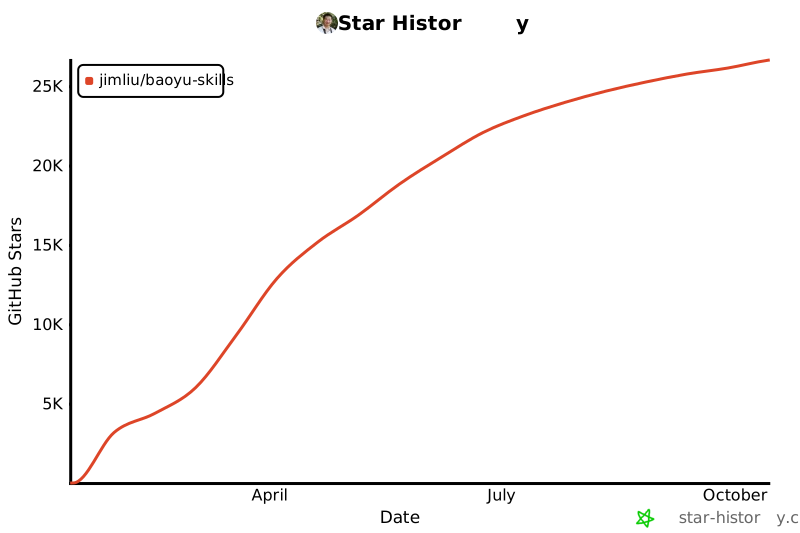](https://www.star-history.com/#JimLiu/baoyu-skills&Date)
|