1275 lines
51 KiB
Markdown
1275 lines
51 KiB
Markdown
# baoyu-skills
|
||
|
||
[English](./README.md) | 中文
|
||
|
||
宝玉分享的 Claude Code 技能集,提升日常工作效率。
|
||
|
||
## 前置要求
|
||
|
||
- 已安装 Node.js 环境
|
||
- 能够运行 `npx bun` 命令
|
||
|
||
## 安装
|
||
|
||
### 快速安装(推荐)
|
||
|
||
```bash
|
||
npx skills add jimliu/baoyu-skills
|
||
```
|
||
|
||
### 发布到 ClawHub / OpenClaw
|
||
|
||
现在这个仓库支持把每个 `skills/baoyu-*` 目录作为独立 ClawHub skill 发布。
|
||
|
||
```bash
|
||
# 预览将要发布的变更
|
||
./scripts/sync-clawhub.sh --dry-run
|
||
|
||
# 发布 ./skills 下所有已变更的 skill
|
||
./scripts/sync-clawhub.sh --all
|
||
```
|
||
|
||
ClawHub 按“单个 skill”安装,不是把整个 marketplace 一次性装进去。发布后,用户可以按需安装:
|
||
|
||
```bash
|
||
clawhub install baoyu-imagine
|
||
clawhub install baoyu-markdown-to-html
|
||
```
|
||
|
||
根据 ClawHub 的 registry 规则,发布到 ClawHub 的 skill 会以 `MIT-0` 许可分发。
|
||
|
||
### 注册插件市场
|
||
|
||
在 Claude Code 中运行:
|
||
|
||
```bash
|
||
/plugin marketplace add JimLiu/baoyu-skills
|
||
```
|
||
|
||
### 安装技能
|
||
|
||
**方式一:通过浏览界面**
|
||
|
||
1. 选择 **Browse and install plugins**
|
||
2. 选择 **baoyu-skills**
|
||
3. 选择 **baoyu-skills** 插件
|
||
4. 选择 **Install now**
|
||
|
||
**方式二:直接安装**
|
||
|
||
```bash
|
||
# 安装 marketplace 中唯一的插件
|
||
/plugin install baoyu-skills@baoyu-skills
|
||
```
|
||
|
||
**方式三:告诉 Agent**
|
||
|
||
直接告诉 Claude Code:
|
||
|
||
> 请帮我安装 github.com/JimLiu/baoyu-skills 中的 Skills
|
||
|
||
### 可用插件
|
||
|
||
现在 marketplace 只暴露一个插件,这样每个 skill 只会注册一次。
|
||
|
||
| 插件 | 说明 | 包含内容 |
|
||
|------|------|----------|
|
||
| **baoyu-skills** | 提供内容生成、AI 后端和日常效率工具技能 | 仓库中的全部 skills,仍按下方的内容技能、AI 生成技能、工具技能三个分类展示 |
|
||
|
||
## 更新技能
|
||
|
||
更新技能到最新版本:
|
||
|
||
1. 在 Claude Code 中运行 `/plugin`
|
||
2. 切换到 **Marketplaces** 标签页(使用方向键或 Tab)
|
||
3. 选择 **baoyu-skills**
|
||
4. 选择 **Update marketplace**
|
||
|
||
也可以选择 **Enable auto-update** 启用自动更新,每次启动时自动获取最新版本。
|
||
|
||

|
||
|
||
## 可用技能
|
||
|
||
技能分为三大类:
|
||
|
||
### 内容技能 (Content Skills)
|
||
|
||
内容生成和发布技能。
|
||
|
||
#### baoyu-xhs-images
|
||
|
||
小红书图片卡片系列生成器。将内容拆解为 1-10 张卡通风格图片卡片,支持 **风格 × 布局** 系统和可选配色覆盖。
|
||
|
||
```bash
|
||
# 自动选择风格和布局
|
||
/baoyu-xhs-images posts/ai-future/article.md
|
||
|
||
# 指定风格
|
||
/baoyu-xhs-images posts/ai-future/article.md --style notion
|
||
|
||
# 指定布局
|
||
/baoyu-xhs-images posts/ai-future/article.md --layout dense
|
||
|
||
# 组合风格和布局
|
||
/baoyu-xhs-images posts/ai-future/article.md --style notion --layout list
|
||
|
||
# 覆盖配色
|
||
/baoyu-xhs-images posts/ai-future/article.md --style notion --palette macaron
|
||
|
||
# 直接输入内容
|
||
/baoyu-xhs-images 今日星座运势
|
||
|
||
# 非交互模式(跳过所有确认,适用于定时任务)
|
||
/baoyu-xhs-images posts/ai-future/article.md --yes
|
||
/baoyu-xhs-images posts/ai-future/article.md --yes --preset knowledge-card
|
||
```
|
||
|
||
**风格**(视觉美学):`cute`(默认)、`fresh`、`warm`、`bold`、`minimal`、`retro`、`pop`、`notion`、`chalkboard`、`study-notes`、`screen-print`、`sketch-notes`
|
||
|
||
**配色**(可选颜色覆盖):`macaron`、`warm`、`neon`
|
||
|
||
**风格预览**:
|
||
|
||
| | | |
|
||
|:---:|:---:|:---:|
|
||
|  |  |  |
|
||
| cute | fresh | warm |
|
||
|  |  |  |
|
||
| bold | minimal | retro |
|
||
|  |  |  |
|
||
| pop | notion | chalkboard |
|
||
|
||
**布局**(信息密度):
|
||
| 布局 | 密度 | 适用场景 |
|
||
|------|------|----------|
|
||
| `sparse` | 1-2 点 | 封面、金句 |
|
||
| `balanced` | 3-4 点 | 常规内容 |
|
||
| `dense` | 5-8 点 | 知识卡片、干货总结 |
|
||
| `list` | 4-7 项 | 清单、排行 |
|
||
| `comparison` | 双栏 | 对比、优劣 |
|
||
| `flow` | 3-6 步 | 流程、时间线 |
|
||
|
||
**布局预览**:
|
||
|
||
| | | |
|
||
|:---:|:---:|:---:|
|
||
|  |  |  |
|
||
| sparse | balanced | dense |
|
||
|  |  |  |
|
||
| list | comparison | flow |
|
||
|
||
#### baoyu-infographic
|
||
|
||
专业信息图生成器,支持 21 种布局和 21 种视觉风格。分析内容后推荐布局×风格组合,生成可发布的信息图。
|
||
|
||
```bash
|
||
# 根据内容自动推荐组合
|
||
/baoyu-infographic path/to/content.md
|
||
|
||
# 指定布局
|
||
/baoyu-infographic path/to/content.md --layout pyramid
|
||
|
||
# 指定风格(默认:craft-handmade)
|
||
/baoyu-infographic path/to/content.md --style technical-schematic
|
||
|
||
# 同时指定布局和风格
|
||
/baoyu-infographic path/to/content.md --layout funnel --style corporate-memphis
|
||
|
||
# 指定比例(预设名称或自定义 W:H)
|
||
/baoyu-infographic path/to/content.md --aspect portrait
|
||
/baoyu-infographic path/to/content.md --aspect 3:4
|
||
```
|
||
|
||
**选项**:
|
||
| 选项 | 说明 |
|
||
|------|------|
|
||
| `--layout <name>` | 信息布局(20 种选项) |
|
||
| `--style <name>` | 视觉风格(17 种选项,默认:craft-handmade) |
|
||
| `--aspect <ratio>` | 预设:landscape (16:9)、portrait (9:16)、square (1:1)。自定义:任意 W:H 比例(如 3:4、4:3、2.35:1) |
|
||
| `--lang <code>` | 输出语言(en、zh、ja 等) |
|
||
|
||
**布局**(信息结构):
|
||
|
||
| 布局 | 适用场景 |
|
||
|------|----------|
|
||
| `bridge` | 问题→解决方案、跨越鸿沟 |
|
||
| `circular-flow` | 循环、周期性流程 |
|
||
| `comparison-table` | 多因素对比 |
|
||
| `do-dont` | 正确 vs 错误做法 |
|
||
| `equation` | 公式分解、输入→输出 |
|
||
| `feature-list` | 产品功能、要点列表 |
|
||
| `fishbone` | 根因分析、鱼骨图 |
|
||
| `funnel` | 转化漏斗、筛选过程 |
|
||
| `grid-cards` | 多主题概览、卡片网格 |
|
||
| `iceberg` | 表面 vs 隐藏层面 |
|
||
| `journey-path` | 用户旅程、里程碑 |
|
||
| `layers-stack` | 技术栈、分层结构 |
|
||
| `mind-map` | 头脑风暴、思维导图 |
|
||
| `nested-circles` | 影响层级、范围圈 |
|
||
| `priority-quadrants` | 四象限矩阵、优先级 |
|
||
| `pyramid` | 层级金字塔、马斯洛需求 |
|
||
| `scale-balance` | 利弊权衡、天平对比 |
|
||
| `timeline-horizontal` | 历史、时间线事件 |
|
||
| `tree-hierarchy` | 组织架构、分类树 |
|
||
| `venn` | 重叠概念、韦恩图 |
|
||
|
||
**布局预览**:
|
||
|
||
| | | |
|
||
|:---:|:---:|:---:|
|
||
|  |  |  |
|
||
| bridge | circular-flow | comparison-table |
|
||
|  |  |  |
|
||
| do-dont | equation | feature-list |
|
||
|  |  |  |
|
||
| fishbone | funnel | grid-cards |
|
||
|  |  |  |
|
||
| iceberg | journey-path | layers-stack |
|
||
|  |  |  |
|
||
| mind-map | nested-circles | priority-quadrants |
|
||
|  |  |  |
|
||
| pyramid | scale-balance | timeline-horizontal |
|
||
|  |  | |
|
||
| tree-hierarchy | venn | |
|
||
|
||
**风格**(视觉美学):
|
||
|
||
| 风格 | 描述 |
|
||
|------|------|
|
||
| `craft-handmade`(默认) | 手绘插画、纸艺风格 |
|
||
| `claymation` | 3D 黏土人物、定格动画感 |
|
||
| `kawaii` | 日系可爱、大眼睛、粉彩色 |
|
||
| `storybook-watercolor` | 柔和水彩、童话绘本 |
|
||
| `chalkboard` | 彩色粉笔、黑板风格 |
|
||
| `cyberpunk-neon` | 霓虹灯光、暗色未来感 |
|
||
| `bold-graphic` | 漫画风格、网点、高对比 |
|
||
| `aged-academia` | 复古科学、泛黄素描 |
|
||
| `corporate-memphis` | 扁平矢量人物、鲜艳填充 |
|
||
| `technical-schematic` | 蓝图、等距 3D、工程图 |
|
||
| `origami` | 折纸形态、几何感 |
|
||
| `pixel-art` | 复古 8-bit、怀旧游戏 |
|
||
| `ui-wireframe` | 灰度框图、界面原型 |
|
||
| `subway-map` | 地铁图、彩色线路 |
|
||
| `ikea-manual` | 极简线条、组装说明风 |
|
||
| `knolling` | 整齐平铺、俯视图 |
|
||
| `lego-brick` | 乐高积木、童趣拼搭 |
|
||
|
||
**风格预览**:
|
||
|
||
| | | |
|
||
|:---:|:---:|:---:|
|
||
|  |  |  |
|
||
| craft-handmade | claymation | kawaii |
|
||
|  |  |  |
|
||
| storybook-watercolor | chalkboard | cyberpunk-neon |
|
||
|  |  |  |
|
||
| bold-graphic | aged-academia | corporate-memphis |
|
||
|  |  |  |
|
||
| technical-schematic | origami | pixel-art |
|
||
|  |  |  |
|
||
| ui-wireframe | subway-map | ikea-manual |
|
||
|  |  | |
|
||
| knolling | lego-brick | |
|
||
|
||
#### baoyu-diagram
|
||
|
||
从源素材生成可直接发布的 SVG 图表 —— 包括流程图、时序/协议图、架构/结构图、示意图(直觉图解)。分析输入素材,推荐图表类型和拆分策略,一次确认后批量生成。Claude 直接输出符合统一设计规范的真实 SVG 代码,产物是自包含的 `.svg` 文件,内嵌样式并自动支持深色模式。
|
||
|
||
```bash
|
||
# 主题描述 —— 技能分析并提出方案
|
||
/baoyu-diagram "JWT 认证流程是怎么工作的"
|
||
/baoyu-diagram "Kubernetes 架构" --type structural
|
||
/baoyu-diagram "OAuth 2.0 流程" --type sequence
|
||
|
||
# 文件路径 —— 技能读取、分析并提出方案
|
||
/baoyu-diagram path/to/article.md
|
||
|
||
# 语言和输出路径
|
||
/baoyu-diagram "微服务架构" --lang zh
|
||
/baoyu-diagram "build pipeline" --out docs/build-pipeline.svg
|
||
```
|
||
|
||
**参数**:
|
||
| 参数 | 说明 |
|
||
|------|------|
|
||
| `--type <name>` | `flowchart`、`sequence`、`structural`、`illustrative`、`class`、`auto`(默认)。跳过类型推荐直接生成。 |
|
||
| `--lang <code>` | 输出语言(en、zh、ja 等) |
|
||
| `--out <path>` | 输出文件路径。生成聚焦于最重要内容的单张图表。 |
|
||
|
||
**五种图表类型**:
|
||
|
||
| 类型 | 适用场景 | 触发动词 |
|
||
|------|----------|----------|
|
||
| `flowchart` | 按顺序走一遍流程 | 流程、步骤、工作流、生命周期、状态机 |
|
||
| `sequence` | 谁和谁通信、按什么顺序 | 协议、握手、认证流程、OAuth、TCP、请求/响应 |
|
||
| `structural` | 展示什么包含什么、如何组织 | 架构、组件、拓扑、布局、什么在什么里面 |
|
||
| `illustrative` | 建立直觉 —— 画出机制本身 | 怎么工作、原理、为什么、直观解释 |
|
||
| `class` | 类型是什么、它们如何关联 | 类图、UML、继承、接口、数据模型 |
|
||
|
||
本技能不调用任何图像生成模型 —— Claude 通过手算坐标直接写 SVG 代码,确保每个图表都遵守设计规范。内嵌的 `<style>` 块包含 `@media (prefers-color-scheme: dark)`,同一个文件在浅色和深色模式下均正确渲染,可嵌入到任意支持 SVG 的宿主环境中。
|
||
|
||
#### baoyu-cover-image
|
||
|
||
为文章生成封面图,支持五维定制系统:类型 × 配色 × 渲染 × 文字 × 氛围。11 种配色方案与 7 种渲染风格组合,提供 77 种独特效果。
|
||
|
||
```bash
|
||
# 根据内容自动选择所有维度
|
||
/baoyu-cover-image path/to/article.md
|
||
|
||
# 快速模式:跳过确认,使用自动选择
|
||
/baoyu-cover-image path/to/article.md --quick
|
||
|
||
# 指定维度(5D 系统)
|
||
/baoyu-cover-image path/to/article.md --type conceptual --palette cool --rendering digital
|
||
/baoyu-cover-image path/to/article.md --text title-subtitle --mood bold
|
||
|
||
# 风格预设(向后兼容的简写方式)
|
||
/baoyu-cover-image path/to/article.md --style blueprint
|
||
|
||
# 指定宽高比(默认:16:9)
|
||
/baoyu-cover-image path/to/article.md --aspect 2.35:1
|
||
|
||
# 纯视觉(不含标题文字)
|
||
/baoyu-cover-image path/to/article.md --no-title
|
||
```
|
||
|
||
**五个维度**:
|
||
- **类型 (Type)**:`hero`、`conceptual`、`typography`、`metaphor`、`scene`、`minimal`
|
||
- **配色 (Palette)**:`warm`、`elegant`、`cool`、`dark`、`earth`、`vivid`、`pastel`、`mono`、`retro`、`duotone`、`macaron`
|
||
- **渲染 (Rendering)**:`flat-vector`、`hand-drawn`、`painterly`、`digital`、`pixel`、`chalk`、`screen-print`
|
||
- **文字 (Text)**:`none`、`title-only`(默认)、`title-subtitle`、`text-rich`
|
||
- **氛围 (Mood)**:`subtle`、`balanced`(默认)、`bold`
|
||
|
||
#### baoyu-slide-deck
|
||
|
||
从内容生成专业的幻灯片图片。先创建包含样式说明的完整大纲,然后逐页生成幻灯片图片。
|
||
|
||
```bash
|
||
# 从 markdown 文件生成
|
||
/baoyu-slide-deck path/to/article.md
|
||
|
||
# 指定风格和受众
|
||
/baoyu-slide-deck path/to/article.md --style corporate
|
||
/baoyu-slide-deck path/to/article.md --audience executives
|
||
|
||
# 指定页数
|
||
/baoyu-slide-deck path/to/article.md --slides 15
|
||
|
||
# 仅生成大纲(不生成图片)
|
||
/baoyu-slide-deck path/to/article.md --outline-only
|
||
|
||
# 指定语言
|
||
/baoyu-slide-deck path/to/article.md --lang zh
|
||
```
|
||
|
||
**选项**:
|
||
|
||
| 选项 | 说明 |
|
||
|------|------|
|
||
| `--style <name>` | 视觉风格:预设名称或 `custom` |
|
||
| `--audience <type>` | 目标受众:beginners、intermediate、experts、executives、general |
|
||
| `--lang <code>` | 输出语言(en、zh、ja 等) |
|
||
| `--slides <number>` | 目标页数(推荐 8-25,最多 30) |
|
||
| `--outline-only` | 仅生成大纲,跳过图片 |
|
||
| `--prompts-only` | 生成大纲 + 提示词,跳过图片 |
|
||
| `--images-only` | 从现有提示词生成图片 |
|
||
| `--regenerate <N>` | 重新生成指定页:`3` 或 `2,5,8` |
|
||
|
||
**风格系统**:
|
||
|
||
风格由 4 个维度组合而成:**纹理** × **氛围** × **字体** × **密度**
|
||
|
||
| 维度 | 选项 |
|
||
|------|------|
|
||
| 纹理 | clean 纯净、grid 网格、organic 有机、pixel 像素、paper 纸张 |
|
||
| 氛围 | professional 专业、warm 温暖、cool 冷静、vibrant 鲜艳、dark 暗色、neutral 中性 |
|
||
| 字体 | geometric 几何、humanist 人文、handwritten 手写、editorial 编辑、technical 技术 |
|
||
| 密度 | minimal 极简、balanced 均衡、dense 密集 |
|
||
|
||
**预设**(预配置的维度组合):
|
||
|
||
| 预设 | 维度组合 | 适用场景 |
|
||
|------|----------|----------|
|
||
| `blueprint`(默认) | grid + cool + technical + balanced | 架构设计、系统设计 |
|
||
| `chalkboard` | organic + warm + handwritten + balanced | 教育、教程 |
|
||
| `corporate` | clean + professional + geometric + balanced | 投资者演示、提案 |
|
||
| `minimal` | clean + neutral + geometric + minimal | 高管简报 |
|
||
| `sketch-notes` | organic + warm + handwritten + balanced | 教育、教程 |
|
||
| `watercolor` | organic + warm + humanist + minimal | 生活方式、健康 |
|
||
| `dark-atmospheric` | clean + dark + editorial + balanced | 娱乐、游戏 |
|
||
| `notion` | clean + neutral + geometric + dense | 产品演示、SaaS |
|
||
| `bold-editorial` | clean + vibrant + editorial + balanced | 产品发布、主题演讲 |
|
||
| `editorial-infographic` | clean + cool + editorial + dense | 科技解说、研究 |
|
||
| `fantasy-animation` | organic + vibrant + handwritten + minimal | 教育故事 |
|
||
| `intuition-machine` | clean + cool + technical + dense | 技术文档、学术 |
|
||
| `pixel-art` | pixel + vibrant + technical + balanced | 游戏、开发者 |
|
||
| `scientific` | clean + cool + technical + dense | 生物、化学、医学 |
|
||
| `vector-illustration` | clean + vibrant + humanist + balanced | 创意、儿童内容 |
|
||
| `vintage` | paper + warm + editorial + balanced | 历史、传记 |
|
||
|
||
**风格预览**:
|
||
|
||
| | | |
|
||
|:---:|:---:|:---:|
|
||
|  |  |  |
|
||
| blueprint | chalkboard | bold-editorial |
|
||
|  |  |  |
|
||
| corporate | dark-atmospheric | editorial-infographic |
|
||
|  |  |  |
|
||
| fantasy-animation | intuition-machine | minimal |
|
||
|  |  |  |
|
||
| notion | pixel-art | scientific |
|
||
|  |  |  |
|
||
| sketch-notes | vector-illustration | vintage |
|
||
|  | | |
|
||
| watercolor | | |
|
||
|
||
生成完成后,所有幻灯片会自动合并为 `.pptx` 和 `.pdf` 文件,方便分享。
|
||
|
||
#### baoyu-comic
|
||
|
||
知识漫画创作器,支持画风 × 基调灵活组合。创作带有详细分镜布局的原创教育漫画,逐页生成图片。
|
||
|
||
```bash
|
||
# 从素材文件生成(自动选择画风 + 基调)
|
||
/baoyu-comic posts/turing-story/source.md
|
||
|
||
# 指定画风和基调
|
||
/baoyu-comic posts/turing-story/source.md --art manga --tone warm
|
||
/baoyu-comic posts/turing-story/source.md --art ink-brush --tone dramatic
|
||
|
||
# 使用预设(包含特殊规则)
|
||
/baoyu-comic posts/turing-story/source.md --style ohmsha
|
||
/baoyu-comic posts/turing-story/source.md --style wuxia
|
||
|
||
# 指定布局和比例
|
||
/baoyu-comic posts/turing-story/source.md --layout cinematic
|
||
/baoyu-comic posts/turing-story/source.md --aspect 16:9
|
||
|
||
# 指定语言
|
||
/baoyu-comic posts/turing-story/source.md --lang zh
|
||
|
||
# 直接输入内容
|
||
/baoyu-comic "图灵的故事与计算机科学的诞生"
|
||
```
|
||
|
||
**选项**:
|
||
| 选项 | 取值 |
|
||
|------|------|
|
||
| `--art` | `ligne-claire`(默认)、`manga`、`realistic`、`ink-brush`、`chalk` |
|
||
| `--tone` | `neutral`(默认)、`warm`、`dramatic`、`romantic`、`energetic`、`vintage`、`action` |
|
||
| `--style` | `ohmsha`、`wuxia`、`shoujo`(预设,含特殊规则) |
|
||
| `--layout` | `standard`(默认)、`cinematic`、`dense`、`splash`、`mixed`、`webtoon` |
|
||
| `--aspect` | `3:4`(默认,竖版)、`4:3`(横版)、`16:9`(宽屏) |
|
||
| `--lang` | `auto`(默认)、`zh`、`en`、`ja` 等 |
|
||
|
||
**画风**(渲染技法):
|
||
|
||
| 画风 | 描述 |
|
||
|------|------|
|
||
| `ligne-claire` | 统一线条、平涂色彩,欧洲漫画传统(丁丁、Logicomix) |
|
||
| `manga` | 大眼睛、日漫风格、表情丰富 |
|
||
| `realistic` | 数字绘画、写实比例、精致细腻 |
|
||
| `ink-brush` | 中国水墨笔触、水墨晕染效果 |
|
||
| `chalk` | 黑板粉笔风格、手绘温暖感 |
|
||
|
||
**基调**(氛围/情绪):
|
||
|
||
| 基调 | 描述 |
|
||
|------|------|
|
||
| `neutral` | 平衡、理性、教育性 |
|
||
| `warm` | 怀旧、个人化、温馨 |
|
||
| `dramatic` | 高对比、紧张、有力 |
|
||
| `romantic` | 柔和、唯美、装饰性元素 |
|
||
| `energetic` | 明亮、动感、活力 |
|
||
| `vintage` | 历史感、做旧、时代真实性 |
|
||
| `action` | 速度线、冲击效果、战斗 |
|
||
|
||
**预设**(画风 + 基调 + 特殊规则):
|
||
|
||
| 预设 | 等价于 | 特殊规则 |
|
||
|------|--------|----------|
|
||
| `ohmsha` | manga + neutral | 视觉比喻、禁止大头对话、道具揭秘 |
|
||
| `wuxia` | ink-brush + action | 气功特效、战斗视觉、氛围元素 |
|
||
| `shoujo` | manga + romantic | 装饰元素、眼睛细节、浪漫情节 |
|
||
|
||
**布局**(分镜排列):
|
||
| 布局 | 每页分镜数 | 适用场景 |
|
||
|------|-----------|----------|
|
||
| `standard` | 4-6 | 对话、叙事推进 |
|
||
| `cinematic` | 2-4 | 戏剧性时刻、建立镜头 |
|
||
| `dense` | 6-9 | 技术说明、时间线 |
|
||
| `splash` | 1-2 大图 | 关键时刻、揭示 |
|
||
| `mixed` | 3-7 不等 | 复杂叙事、情感弧线 |
|
||
| `webtoon` | 3-5 竖向 | 欧姆社教程、手机阅读 |
|
||
|
||
**布局预览**:
|
||
|
||
| | | |
|
||
|:---:|:---:|:---:|
|
||
|  |  |  |
|
||
| standard | cinematic | dense |
|
||
|  |  |  |
|
||
| splash | mixed | webtoon |
|
||
|
||
#### baoyu-article-illustrator
|
||
|
||
智能文章插图技能,采用类型 × 风格 × 色板三维系统。分析文章结构,识别需要视觉辅助的位置,生成插图。
|
||
|
||
```bash
|
||
# 根据内容自动选择类型和风格
|
||
/baoyu-article-illustrator path/to/article.md
|
||
|
||
# 组合类型和风格
|
||
/baoyu-article-illustrator path/to/article.md --type flowchart --style notion
|
||
|
||
# 使用色板覆盖
|
||
/baoyu-article-illustrator path/to/article.md --style vector-illustration --palette macaron
|
||
```
|
||
|
||
**类型**(信息结构):
|
||
|
||
| 类型 | 描述 | 适用场景 |
|
||
|------|------|----------|
|
||
| `infographic` | 数据可视化、图表、指标 | 技术文章、数据分析 |
|
||
| `scene` | 氛围插图、情绪渲染 | 叙事、个人故事 |
|
||
| `flowchart` | 流程图、步骤可视化 | 教程、工作流 |
|
||
| `comparison` | 并排对比、前后对照 | 产品比较 |
|
||
| `framework` | 概念图、关系图 | 方法论、架构 |
|
||
| `timeline` | 时间线进展 | 历史、项目进度 |
|
||
|
||
**风格**(渲染手法):
|
||
|
||
| 风格 | 描述 | 适用场景 |
|
||
|------|------|----------|
|
||
| `notion`(默认) | 极简手绘线条画 | 知识分享、SaaS、生产力 |
|
||
| `elegant` | 精致、优雅 | 商业、思想领导力 |
|
||
| `warm` | 友好、亲切 | 个人成长、生活方式 |
|
||
| `minimal` | 极简、禅意 | 哲学、极简主义 |
|
||
| `blueprint` | 技术蓝图 | 架构、系统设计 |
|
||
| `watercolor` | 柔和艺术感、自然温暖 | 生活方式、旅行、创意 |
|
||
| `editorial` | 杂志风格信息图 | 科技解说、新闻 |
|
||
| `scientific` | 学术精确图表 | 生物、化学、技术 |
|
||
|
||
**色板**(可选配色覆盖):
|
||
|
||
| 色板 | 描述 | 适用场景 |
|
||
|------|------|----------|
|
||
| `macaron` | 马卡龙柔和色块(浅蓝、浅绿、浅紫、浅橙)暖白底 | 教育、知识分享、教程 |
|
||
| `warm` | 暖色系(橙、赭石、金)无冷色 | 品牌、产品、生活方式 |
|
||
| `neon` | 霓虹色(粉、青、黄)深色底 | 游戏、复古、潮流 |
|
||
|
||
**风格预览**:
|
||
|
||
| | | |
|
||
|:---:|:---:|:---:|
|
||
|  |  |  |
|
||
| notion | elegant | warm |
|
||
|  |  |  |
|
||
| minimal | blueprint | watercolor |
|
||
|  |  | |
|
||
| editorial | scientific | |
|
||
|
||
#### baoyu-post-to-x
|
||
|
||
发布内容和文章到 X (Twitter)。支持带图片的普通帖子和 X 文章(长篇 Markdown)。使用真实 Chrome + CDP 绕过反自动化检测。
|
||
|
||
纯文本输入默认按普通帖子处理,Markdown 文件默认按 X 文章处理。脚本会将内容填入浏览器,用户需手动检查并发布。
|
||
|
||
```bash
|
||
# 发布文字
|
||
/baoyu-post-to-x "Hello from Claude Code!"
|
||
|
||
# 发布带图片
|
||
/baoyu-post-to-x "看看这个" --image photo.png
|
||
|
||
# 发布 X 文章
|
||
/baoyu-post-to-x --article path/to/article.md
|
||
```
|
||
|
||
#### baoyu-post-to-wechat
|
||
|
||
发布内容到微信公众号,支持两种模式:
|
||
|
||
**贴图模式** - 多图配短标题和正文:
|
||
|
||
```bash
|
||
/baoyu-post-to-wechat 贴图 --markdown article.md --images ./photos/
|
||
/baoyu-post-to-wechat 贴图 --markdown article.md --image img1.png --image img2.png --image img3.png
|
||
/baoyu-post-to-wechat 贴图 --title "标题" --content "内容" --image img1.png --submit
|
||
```
|
||
|
||
**文章模式** - 完整 markdown/HTML 富文本格式:
|
||
|
||
```bash
|
||
/baoyu-post-to-wechat 文章 --markdown article.md
|
||
/baoyu-post-to-wechat 文章 --markdown article.md --theme grace
|
||
/baoyu-post-to-wechat 文章 --html article.html
|
||
```
|
||
|
||
**发布方式**:
|
||
|
||
| 方式 | 速度 | 要求 |
|
||
|------|------|------|
|
||
| API(推荐) | 快 | API 凭证 |
|
||
| 浏览器 | 慢 | Chrome,登录会话 |
|
||
|
||
**API 配置**(更快的发布方式):
|
||
|
||
```bash
|
||
# 添加到 .baoyu-skills/.env(项目级)或 ~/.baoyu-skills/.env(用户级)
|
||
WECHAT_APP_ID=你的AppID
|
||
WECHAT_APP_SECRET=你的AppSecret
|
||
```
|
||
|
||
获取凭证方法:
|
||
1. 访问 https://developers.weixin.qq.com/platform/
|
||
2. 进入:我的业务 → 公众号 → 开发密钥
|
||
3. 添加开发密钥,复制 AppID 和 AppSecret
|
||
4. 将你操作的机器 IP 加入白名单
|
||
|
||
**浏览器方式**(无需 API 配置):需已安装 Google Chrome,首次运行需扫码登录(登录状态会保存)
|
||
|
||
**多账号支持**:通过 `EXTEND.md` 管理多个微信公众号:
|
||
|
||
```bash
|
||
mkdir -p .baoyu-skills/baoyu-post-to-wechat
|
||
```
|
||
|
||
创建 `.baoyu-skills/baoyu-post-to-wechat/EXTEND.md`:
|
||
|
||
```yaml
|
||
# 全局设置(所有账号共享)
|
||
default_theme: default
|
||
default_color: blue
|
||
|
||
# 账号列表
|
||
accounts:
|
||
- name: 宝玉的技术分享
|
||
alias: baoyu
|
||
default: false
|
||
default_publish_method: api
|
||
default_author: 宝玉
|
||
need_open_comment: 1
|
||
only_fans_can_comment: 0
|
||
app_id: 你的微信AppID
|
||
app_secret: 你的微信AppSecret
|
||
- name: AI 工具集
|
||
alias: ai-tools
|
||
default_publish_method: browser
|
||
default_author: AI 工具集
|
||
need_open_comment: 1
|
||
only_fans_can_comment: 0
|
||
```
|
||
|
||
| 账号配置情况 | 行为 |
|
||
|-------------|------|
|
||
| 无 `accounts` 块 | 单账号模式(向后兼容) |
|
||
| 1 个账号 | 自动选择,无需提示 |
|
||
| 2+ 个账号 | 提示选择,或使用 `--account <别名>` |
|
||
| 某账号设置 `default: true` | 预选为默认账号 |
|
||
|
||
每个账号拥有独立的 Chrome 配置目录,保证浏览器方式下的登录会话互不干扰。API 凭证可在 EXTEND.md 中直接配置,也可通过 `.env` 文件使用别名前缀的环境变量(如 `WECHAT_BAOYU_APP_ID`)。
|
||
|
||
#### baoyu-post-to-weibo
|
||
|
||
发布内容到微博。支持文字、图片、视频发布和头条文章(长篇 Markdown)。使用真实 Chrome + CDP 绕过反自动化检测。
|
||
|
||
**普通微博** - 文字 + 图片/视频(最多 18 个文件):
|
||
|
||
```bash
|
||
# 发布文字
|
||
/baoyu-post-to-weibo "Hello Weibo!"
|
||
|
||
# 发布带图片
|
||
/baoyu-post-to-weibo "看看这个" --image photo.png
|
||
|
||
# 发布带视频
|
||
/baoyu-post-to-weibo "看这个" --video clip.mp4
|
||
```
|
||
|
||
**头条文章** - 长篇 Markdown 文章:
|
||
|
||
```bash
|
||
# 发布文章
|
||
/baoyu-post-to-weibo --article article.md
|
||
|
||
# 带封面图
|
||
/baoyu-post-to-weibo --article article.md --cover cover.jpg
|
||
```
|
||
|
||
**文章选项**:
|
||
| 选项 | 说明 |
|
||
|------|------|
|
||
| `--cover <path>` | 封面图 |
|
||
| `--title <text>` | 覆盖标题(最多 32 字) |
|
||
| `--summary <text>` | 覆盖摘要(最多 44 字) |
|
||
|
||
**说明**:脚本会将内容填入浏览器,用户需手动检查并发布。首次运行需手动登录微博(登录状态会保存)。
|
||
|
||
### AI 生成技能 (AI Generation Skills)
|
||
|
||
AI 驱动的生成后端。
|
||
|
||
#### baoyu-imagine
|
||
|
||
基于 AI SDK 的图像生成,支持 OpenAI、Azure OpenAI、Google、OpenRouter、DashScope(阿里通义万相)、MiniMax、即梦(Jimeng)、豆包(Seedream)和 Replicate API。支持文生图、参考图、宽高比、自定义尺寸、批量生成和质量预设。
|
||
|
||
```bash
|
||
# 基础生成(自动检测服务商)
|
||
/baoyu-imagine --prompt "一只可爱的猫" --image cat.png
|
||
|
||
# 指定宽高比
|
||
/baoyu-imagine --prompt "风景图" --image landscape.png --ar 16:9
|
||
|
||
# 高质量(2k 分辨率)
|
||
/baoyu-imagine --prompt "横幅图" --image banner.png --quality 2k
|
||
|
||
# 指定服务商
|
||
/baoyu-imagine --prompt "一只猫" --image cat.png --provider openai
|
||
|
||
# Azure OpenAI(model 为部署名称)
|
||
/baoyu-imagine --prompt "一只猫" --image cat.png --provider azure --model gpt-image-1.5
|
||
|
||
# OpenRouter
|
||
/baoyu-imagine --prompt "一只猫" --image cat.png --provider openrouter
|
||
|
||
# OpenRouter + 参考图
|
||
/baoyu-imagine --prompt "把它变成蓝色" --image out.png --provider openrouter --model google/gemini-3.1-flash-image-preview --ref source.png
|
||
|
||
# DashScope(阿里通义万相)
|
||
/baoyu-imagine --prompt "一只可爱的猫" --image cat.png --provider dashscope
|
||
|
||
# DashScope 自定义尺寸
|
||
/baoyu-imagine --prompt "为咖啡品牌设计一张 21:9 横幅海报,包含清晰中文标题" --image banner.png --provider dashscope --model qwen-image-2.0-pro --size 2048x872
|
||
|
||
# Z.AI GLM-Image
|
||
/baoyu-imagine --prompt "一张带清晰中文标题的科技海报" --image out.png --provider zai
|
||
|
||
# MiniMax
|
||
/baoyu-imagine --prompt "A fashion editorial portrait by a bright studio window" --image out.jpg --provider minimax
|
||
|
||
# MiniMax + 角色参考图
|
||
/baoyu-imagine --prompt "A girl stands by the library window, cinematic lighting" --image out.jpg --provider minimax --model image-01 --ref portrait.png --ar 16:9
|
||
|
||
# Replicate(默认:google/nano-banana-2)
|
||
/baoyu-imagine --prompt "一只猫" --image cat.png --provider replicate
|
||
|
||
# Replicate Seedream 4.5
|
||
/baoyu-imagine --prompt "一张影棚人像" --image portrait.png --provider replicate --model bytedance/seedream-4.5 --ar 3:2
|
||
|
||
# Replicate Wan 2.7 Image Pro
|
||
/baoyu-imagine --prompt "一张概念分镜" --image frame.png --provider replicate --model wan-video/wan-2.7-image-pro --size 2048x1152
|
||
|
||
# 即梦(Jimeng)
|
||
/baoyu-imagine --prompt "一只可爱的猫" --image cat.png --provider jimeng
|
||
|
||
# 豆包(Seedream)
|
||
/baoyu-imagine --prompt "一只可爱的猫" --image cat.png --provider seedream
|
||
|
||
# 带参考图(Google、OpenAI、Azure OpenAI、OpenRouter、Replicate、MiniMax 或 Seedream 5.0/4.5/4.0)
|
||
/baoyu-imagine --prompt "把它变成蓝色" --image out.png --ref source.png
|
||
|
||
# 批量模式
|
||
/baoyu-imagine --batchfile batch.json --jobs 4 --json
|
||
```
|
||
|
||
**选项**:
|
||
| 选项 | 说明 |
|
||
|------|------|
|
||
| `--prompt`, `-p` | 提示词文本 |
|
||
| `--promptfiles` | 从文件读取提示词(多文件拼接) |
|
||
| `--image` | 输出图片路径(必需) |
|
||
| `--batchfile` | 多图批量生成的 JSON 文件 |
|
||
| `--jobs` | 批量模式的并发 worker 数 |
|
||
| `--provider` | `google`、`openai`、`azure`、`openrouter`、`dashscope`、`zai`、`minimax`、`jimeng`、`seedream` 或 `replicate` |
|
||
| `--model`, `-m` | 模型 ID 或部署名。Azure 使用部署名;OpenRouter 使用完整模型 ID;Z.AI 使用 `glm-image`;MiniMax 使用 `image-01` / `image-01-live` |
|
||
| `--ar` | 宽高比(如 `16:9`、`1:1`、`4:3`) |
|
||
| `--size` | 尺寸(如 `1024x1024`) |
|
||
| `--quality` | `normal` 或 `2k`(默认:`2k`) |
|
||
| `--imageSize` | Google/OpenRouter 使用的 `1K`、`2K`、`4K` |
|
||
| `--imageApiDialect` | OpenAI 兼容网关的图像 API 方言(`openai-native` 或 `ratio-metadata`) |
|
||
| `--ref` | 参考图片(Google、OpenAI、Azure OpenAI、OpenRouter、Replicate 支持的模型家族、MiniMax 或 Seedream 5.0/4.5/4.0) |
|
||
| `--n` | 单次请求生成图片数量(`replicate` 当前只支持 `--n 1`) |
|
||
| `--json` | 输出 JSON 结果 |
|
||
|
||
**环境变量**(配置方法见[环境配置](#环境配置)):
|
||
| 变量 | 说明 | 默认值 |
|
||
|------|------|--------|
|
||
| `OPENAI_API_KEY` | OpenAI API 密钥 | - |
|
||
| `AZURE_OPENAI_API_KEY` | Azure OpenAI API 密钥 | - |
|
||
| `OPENROUTER_API_KEY` | OpenRouter API 密钥 | - |
|
||
| `GOOGLE_API_KEY` | Google API 密钥 | - |
|
||
| `GEMINI_API_KEY` | `GOOGLE_API_KEY` 的别名 | - |
|
||
| `DASHSCOPE_API_KEY` | DashScope API 密钥(阿里云) | - |
|
||
| `ZAI_API_KEY` | Z.AI API 密钥 | - |
|
||
| `BIGMODEL_API_KEY` | Z.AI API 密钥向后兼容别名 | - |
|
||
| `MINIMAX_API_KEY` | MiniMax API 密钥 | - |
|
||
| `REPLICATE_API_TOKEN` | Replicate API Token | - |
|
||
| `JIMENG_ACCESS_KEY_ID` | 即梦火山引擎 Access Key | - |
|
||
| `JIMENG_SECRET_ACCESS_KEY` | 即梦火山引擎 Secret Key | - |
|
||
| `ARK_API_KEY` | 豆包火山引擎 ARK API 密钥 | - |
|
||
| `OPENAI_IMAGE_MODEL` | OpenAI 模型 | `gpt-image-1.5` |
|
||
| `AZURE_OPENAI_DEPLOYMENT` | Azure 默认部署名 | - |
|
||
| `AZURE_OPENAI_IMAGE_MODEL` | 兼容旧配置的 Azure 部署/模型别名 | `gpt-image-1.5` |
|
||
| `OPENROUTER_IMAGE_MODEL` | OpenRouter 模型 | `google/gemini-3.1-flash-image-preview` |
|
||
| `GOOGLE_IMAGE_MODEL` | Google 模型 | `gemini-3-pro-image-preview` |
|
||
| `DASHSCOPE_IMAGE_MODEL` | DashScope 模型 | `qwen-image-2.0-pro` |
|
||
| `ZAI_IMAGE_MODEL` | Z.AI 模型 | `glm-image` |
|
||
| `BIGMODEL_IMAGE_MODEL` | Z.AI 模型向后兼容别名 | `glm-image` |
|
||
| `MINIMAX_IMAGE_MODEL` | MiniMax 模型 | `image-01` |
|
||
| `REPLICATE_IMAGE_MODEL` | Replicate 模型 | `google/nano-banana-2` |
|
||
| `JIMENG_IMAGE_MODEL` | 即梦模型 | `jimeng_t2i_v40` |
|
||
| `SEEDREAM_IMAGE_MODEL` | 豆包模型 | `doubao-seedream-5-0-260128` |
|
||
| `OPENAI_BASE_URL` | 自定义 OpenAI 端点 | - |
|
||
| `OPENAI_IMAGE_API_DIALECT` | OpenAI 兼容图像 API 方言(`openai-native` 或 `ratio-metadata`) | `openai-native` |
|
||
| `OPENAI_IMAGE_USE_CHAT` | OpenAI 改走 `/chat/completions` | `false` |
|
||
| `AZURE_OPENAI_BASE_URL` | Azure 资源或部署端点 | - |
|
||
| `AZURE_API_VERSION` | Azure 图像 API 版本 | `2025-04-01-preview` |
|
||
| `OPENROUTER_BASE_URL` | 自定义 OpenRouter 端点 | `https://openrouter.ai/api/v1` |
|
||
| `OPENROUTER_HTTP_REFERER` | OpenRouter 归因用站点 URL | - |
|
||
| `OPENROUTER_TITLE` | OpenRouter 归因用应用名 | - |
|
||
| `GOOGLE_BASE_URL` | 自定义 Google 端点 | - |
|
||
| `DASHSCOPE_BASE_URL` | 自定义 DashScope 端点 | - |
|
||
| `ZAI_BASE_URL` | 自定义 Z.AI 端点 | `https://api.z.ai/api/paas/v4` |
|
||
| `BIGMODEL_BASE_URL` | Z.AI 端点向后兼容别名 | - |
|
||
| `MINIMAX_BASE_URL` | 自定义 MiniMax 端点 | `https://api.minimax.io` |
|
||
| `REPLICATE_BASE_URL` | 自定义 Replicate 端点 | - |
|
||
| `JIMENG_BASE_URL` | 自定义即梦端点 | `https://visual.volcengineapi.com` |
|
||
| `JIMENG_REGION` | 即梦区域 | `cn-north-1` |
|
||
| `SEEDREAM_BASE_URL` | 自定义豆包端点 | `https://ark.cn-beijing.volces.com/api/v3` |
|
||
| `BAOYU_IMAGE_GEN_MAX_WORKERS` | 批量模式最大 worker 数 | `10` |
|
||
| `BAOYU_IMAGE_GEN_<PROVIDER>_CONCURRENCY` | 覆盖 provider 并发数 | provider 默认值 |
|
||
| `BAOYU_IMAGE_GEN_<PROVIDER>_START_INTERVAL_MS` | 覆盖 provider 请求启动间隔 | provider 默认值 |
|
||
|
||
**Provider 说明**:
|
||
- Azure OpenAI:`--model` 表示 Azure deployment name,不是底层模型家族名。
|
||
- DashScope:`qwen-image-2.0-pro` 是自定义 `--size`、`21:9` 和中英文排版的推荐默认模型。
|
||
- Z.AI:`glm-image` 适合海报、图表和中英文排版密集的图片生成,暂不支持参考图。
|
||
- MiniMax:`image-01` 支持官方文档里的自定义 `width` / `height`;`image-01-live` 更偏低延迟,适合配合 `--ar` 使用。
|
||
- MiniMax 参考图会走 `subject_reference`,当前能力更偏角色 / 人像一致性。
|
||
- 即梦不支持参考图。
|
||
- 豆包参考图能力仅适用于 Seedream 5.0 / 4.5 / 4.0,不适用于 Seedream 3.0。
|
||
- Replicate 默认模型改为 `google/nano-banana-2`。`baoyu-imagine` 目前只对 `google/nano-banana*`、`bytedance/seedream-4.5`、`bytedance/seedream-5-lite`、`wan-video/wan-2.7-image` 和 `wan-video/wan-2.7-image-pro` 开启本地能力识别与校验。
|
||
- Replicate 当前只保存单张输出图,`--n > 1` 会在本地直接报错,避免多图结果被静默丢弃。
|
||
- Replicate 的参数能力按模型家族区分:nano-banana 走 `--quality` / `--ar`,Seedream 走校验后的 `--size` / `--ar`,Wan 走校验后的 `--size`(`--ar` 会先在本地换算成具体尺寸)。
|
||
|
||
**服务商自动选择**:
|
||
1. 如果指定了 `--provider` → 使用指定的
|
||
2. 如果传了 `--ref` 且未指定 provider → 依次尝试 Google、OpenAI、Azure、OpenRouter、Replicate、Seedream,最后是 MiniMax
|
||
3. 如果只有一个 API 密钥 → 使用对应服务商
|
||
4. 如果多个可用 → 默认使用 Google,然后依次为 OpenAI、Azure、OpenRouter、DashScope、Z.AI、MiniMax、Replicate、即梦、豆包
|
||
|
||
#### baoyu-danger-gemini-web
|
||
|
||
与 Gemini Web 交互,生成文本和图片。
|
||
|
||
**文本生成:**
|
||
|
||
```bash
|
||
/baoyu-danger-gemini-web "你好,Gemini"
|
||
/baoyu-danger-gemini-web --prompt "解释量子计算"
|
||
```
|
||
|
||
**图片生成:**
|
||
|
||
```bash
|
||
/baoyu-danger-gemini-web --prompt "一只可爱的猫" --image cat.png
|
||
/baoyu-danger-gemini-web --promptfiles system.md content.md --image out.png
|
||
```
|
||
|
||
### 工具技能 (Utility Skills)
|
||
|
||
内容处理工具。
|
||
|
||
#### baoyu-youtube-transcript
|
||
|
||
下载 YouTube 视频字幕/转录文本和封面图片。支持多语言、翻译、章节分段和说话人识别。缓存原始数据以便快速重新格式化。
|
||
|
||
```bash
|
||
# 默认:带时间戳的 Markdown
|
||
/baoyu-youtube-transcript https://www.youtube.com/watch?v=VIDEO_ID
|
||
|
||
# 指定语言(按优先级排列)
|
||
/baoyu-youtube-transcript https://youtu.be/VIDEO_ID --languages zh,en,ja
|
||
|
||
# 章节分段 + 说话人识别
|
||
/baoyu-youtube-transcript https://youtu.be/VIDEO_ID --chapters --speakers
|
||
|
||
# SRT 字幕格式
|
||
/baoyu-youtube-transcript https://youtu.be/VIDEO_ID --format srt
|
||
|
||
# 列出可用字幕
|
||
/baoyu-youtube-transcript https://youtu.be/VIDEO_ID --list
|
||
```
|
||
|
||
**选项**:
|
||
| 选项 | 说明 | 默认值 |
|
||
|------|------|--------|
|
||
| `<url-or-id>` | YouTube URL 或视频 ID | 必填 |
|
||
| `--languages <codes>` | 语言代码,逗号分隔 | `en` |
|
||
| `--format <fmt>` | 输出格式:`text`、`srt` | `text` |
|
||
| `--translate <code>` | 翻译为指定语言 | |
|
||
| `--chapters` | 根据视频描述进行章节分段 | |
|
||
| `--speakers` | 说话人识别(需 AI 后处理) | |
|
||
| `--no-timestamps` | 禁用时间戳 | |
|
||
| `--list` | 列出可用字幕 | |
|
||
| `--refresh` | 强制重新获取,忽略缓存 | |
|
||
|
||
#### baoyu-url-to-markdown
|
||
|
||
通过 Chrome CDP 抓取任意 URL 并转换为 Markdown。同时保存渲染后的 HTML 快照,Defuddle 失败时自动回退到旧版提取器。
|
||
|
||
```bash
|
||
# 自动模式(默认)- 页面加载后立即抓取
|
||
/baoyu-url-to-markdown https://example.com/article
|
||
|
||
# 等待模式 - 适用于需要登录的页面
|
||
/baoyu-url-to-markdown https://example.com/private --wait
|
||
|
||
# 保存到指定文件
|
||
/baoyu-url-to-markdown https://example.com/article -o output.md
|
||
```
|
||
|
||
**抓取模式**:
|
||
| 模式 | 说明 | 适用场景 |
|
||
|------|------|----------|
|
||
| 自动(默认) | 页面加载后立即抓取 | 公开页面、静态内容 |
|
||
| 等待(`--wait`) | 等待用户信号后抓取 | 需登录页面、动态内容 |
|
||
|
||
**选项**:
|
||
| 选项 | 说明 |
|
||
|------|------|
|
||
| `<url>` | 要抓取的 URL |
|
||
| `-o <path>` | 输出文件路径 |
|
||
| `--wait` | 等待用户信号后抓取 |
|
||
| `--timeout <ms>` | 页面加载超时(默认:30000) |
|
||
|
||
#### baoyu-danger-x-to-markdown
|
||
|
||
将 X (Twitter) 内容转换为 markdown 格式。支持推文串和 X 文章。
|
||
|
||
```bash
|
||
# 将推文转换为 markdown
|
||
/baoyu-danger-x-to-markdown https://x.com/username/status/123456
|
||
|
||
# 保存到指定文件
|
||
/baoyu-danger-x-to-markdown https://x.com/username/status/123456 -o output.md
|
||
|
||
# JSON 输出
|
||
/baoyu-danger-x-to-markdown https://x.com/username/status/123456 --json
|
||
|
||
# 下载媒体文件(图片/视频)到本地
|
||
/baoyu-danger-x-to-markdown https://x.com/username/status/123456 --download-media
|
||
```
|
||
|
||
**支持的 URL:**
|
||
- `https://x.com/<user>/status/<id>`
|
||
- `https://twitter.com/<user>/status/<id>`
|
||
- `https://x.com/i/article/<id>`
|
||
|
||
**身份验证:** 使用环境变量(`X_AUTH_TOKEN`、`X_CT0`)或 Chrome 登录进行 cookie 认证。
|
||
|
||
#### baoyu-compress-image
|
||
|
||
压缩图片以减小文件大小,同时保持质量。
|
||
|
||
```bash
|
||
/baoyu-compress-image path/to/image.png
|
||
/baoyu-compress-image path/to/images/ --quality 80
|
||
```
|
||
|
||
#### baoyu-format-markdown
|
||
|
||
格式化纯文本或 Markdown 文件,添加 frontmatter、标题、摘要、层级标题、加粗、列表和代码块。
|
||
|
||
```bash
|
||
# 格式化 markdown 文件
|
||
/baoyu-format-markdown path/to/article.md
|
||
|
||
# 格式化指定文件
|
||
/baoyu-format-markdown path/to/draft.md
|
||
```
|
||
|
||
**工作流程**:
|
||
1. 读取源文件并分析内容结构
|
||
2. 检查/创建 YAML frontmatter(title、slug、summary、coverImage)
|
||
3. 处理标题:使用现有标题、提取 H1 或生成候选标题
|
||
4. 应用格式:层级标题、加粗、列表、代码块、引用
|
||
5. 保存为 `{文件名}-formatted.md`
|
||
6. 运行排版脚本:半角引号→全角引号、中英文空格、autocorrect
|
||
|
||
**Frontmatter 字段**:
|
||
| 字段 | 处理方式 |
|
||
|------|----------|
|
||
| `title` | 使用现有、提取 H1 或生成候选 |
|
||
| `slug` | 从文件路径推断或根据标题生成 |
|
||
| `summary` | 生成吸引人的摘要(100-150 字) |
|
||
| `coverImage` | 检查同目录下 `imgs/cover.png` |
|
||
|
||
**格式化规则**:
|
||
| 元素 | 格式 |
|
||
|------|------|
|
||
| 标题 | `#`、`##`、`###` 层级 |
|
||
| 重点内容 | `**加粗**` |
|
||
| 并列要点 | `-` 无序列表或 `1.` 有序列表 |
|
||
| 代码/命令 | `` `行内` `` 或 ` ```代码块``` ` |
|
||
| 引用 | `>` 引用块 |
|
||
|
||
#### baoyu-markdown-to-html
|
||
|
||
将 Markdown 文件转换为样式化 HTML,支持微信公众号兼容主题、代码高亮,以及可选的外链底部引用。
|
||
|
||
```bash
|
||
# 基础转换
|
||
/baoyu-markdown-to-html article.md
|
||
|
||
# 主题 + 颜色
|
||
/baoyu-markdown-to-html article.md --theme grace --color red
|
||
|
||
# 将普通外链转换为文末引用
|
||
/baoyu-markdown-to-html article.md --cite
|
||
```
|
||
|
||
#### baoyu-translate
|
||
|
||
三模式翻译技能:快速(直接翻译)、标准(分析后翻译)、精翻(完整出版级工作流,含审校与润色)。
|
||
|
||
```bash
|
||
# 标准模式(默认)- 先分析再翻译
|
||
/translate article.md --to zh-CN
|
||
|
||
# 快速模式 - 直接翻译
|
||
/translate article.md --mode quick --to ja
|
||
|
||
# 精翻模式 - 完整工作流,含审校与润色
|
||
/translate article.md --mode refined --to zh-CN
|
||
|
||
# 翻译 URL
|
||
/translate https://example.com/article --to zh-CN
|
||
|
||
# 指定受众
|
||
/translate article.md --to zh-CN --audience technical
|
||
|
||
# 指定风格
|
||
/translate article.md --to zh-CN --style humorous
|
||
|
||
# 附加术语表
|
||
/translate article.md --to zh-CN --glossary my-terms.md
|
||
```
|
||
|
||
**选项**:
|
||
| 选项 | 说明 |
|
||
|------|------|
|
||
| `<source>` | 文件路径、URL 或行内文本 |
|
||
| `--mode <mode>` | `quick`、`normal`(默认)、`refined` |
|
||
| `--from <lang>` | 源语言(省略则自动检测) |
|
||
| `--to <lang>` | 目标语言(默认:`zh-CN`) |
|
||
| `--audience <type>` | 目标读者(默认:`general`) |
|
||
| `--style <style>` | 翻译风格(默认:`storytelling`) |
|
||
| `--glossary <file>` | 附加术语表文件 |
|
||
|
||
**模式**:
|
||
| 模式 | 步骤 | 适用场景 |
|
||
|------|------|----------|
|
||
| 快速 | 翻译 | 短文本、非正式内容 |
|
||
| 标准 | 分析 → 翻译 | 文章、博客 |
|
||
| 精翻 | 分析 → 翻译 → 审校 → 润色 | 出版级文档 |
|
||
|
||
标准模式完成后,可回复「继续润色」或「refine」继续审校润色步骤。
|
||
|
||
**受众预设**:
|
||
| 值 | 说明 |
|
||
|----|------|
|
||
| `general` | 普通读者(默认)— 通俗语言,更多译注 |
|
||
| `technical` | 开发者/工程师 — 常见技术术语少加注释 |
|
||
| `academic` | 研究者/学者 — 正式语体,精确术语 |
|
||
| `business` | 商务人士 — 商务友好语气 |
|
||
|
||
也支持自定义受众描述,如 `--audience "对 AI 感兴趣的普通读者"`。
|
||
|
||
**风格预设**:
|
||
| 值 | 说明 |
|
||
|----|------|
|
||
| `storytelling` | 叙事流畅(默认)— 过渡自然,表达生动 |
|
||
| `formal` | 正式、结构化 — 中性语气,无口语化表达 |
|
||
| `technical` | 精确、文档风格 — 简洁,术语密集 |
|
||
| `literal` | 贴近原文结构 — 最小化重构 |
|
||
| `academic` | 学术、严谨 — 正式语体,复杂从句可接受 |
|
||
| `business` | 简洁、结果导向 — 行动导向,高管友好 |
|
||
| `humorous` | 保留幽默感 — 诙谐,在目标语言中重现喜剧效果 |
|
||
| `conversational` | 口语化、亲切 — 友好,如同朋友间解释 |
|
||
| `elegant` | 文学性、优雅 — 精心雕琢,注重韵律美感 |
|
||
|
||
也支持自定义风格描述,如 `--style "诗意而抒情"`。
|
||
|
||
**特性**:
|
||
- 通过 EXTEND.md 自定义术语表,内置英中术语表
|
||
- 面向受众的翻译,可调节注释深度
|
||
- 长文档(4000+ 词)自动分块并行翻译
|
||
- 比喻和修辞按意译而非逐字翻译
|
||
- 为文化/专业术语添加译注
|
||
- 输出目录保留所有中间文件
|
||
|
||
## 环境配置
|
||
|
||
部分技能需要 API 密钥或自定义配置。环境变量可以在 `.env` 文件中设置:
|
||
|
||
**加载优先级**(高优先级覆盖低优先级):
|
||
1. 命令行环境变量(如 `OPENAI_API_KEY=xxx /baoyu-imagine ...`)
|
||
2. `process.env`(系统环境变量)
|
||
3. `<cwd>/.baoyu-skills/.env`(项目级)
|
||
4. `~/.baoyu-skills/.env`(用户级)
|
||
|
||
**配置方法**:
|
||
|
||
```bash
|
||
# 创建用户级配置目录
|
||
mkdir -p ~/.baoyu-skills
|
||
|
||
# 创建 .env 文件
|
||
cat > ~/.baoyu-skills/.env << 'EOF'
|
||
# OpenAI
|
||
OPENAI_API_KEY=sk-xxx
|
||
OPENAI_IMAGE_MODEL=gpt-image-1.5
|
||
# OPENAI_BASE_URL=https://api.openai.com/v1
|
||
# OPENAI_IMAGE_USE_CHAT=false
|
||
|
||
# Azure OpenAI
|
||
AZURE_OPENAI_API_KEY=xxx
|
||
AZURE_OPENAI_BASE_URL=https://your-resource.openai.azure.com
|
||
AZURE_OPENAI_DEPLOYMENT=gpt-image-1.5
|
||
# AZURE_API_VERSION=2025-04-01-preview
|
||
|
||
# OpenRouter
|
||
OPENROUTER_API_KEY=sk-or-xxx
|
||
OPENROUTER_IMAGE_MODEL=google/gemini-3.1-flash-image-preview
|
||
# OPENROUTER_BASE_URL=https://openrouter.ai/api/v1
|
||
# OPENROUTER_HTTP_REFERER=https://your-app.example.com
|
||
# OPENROUTER_TITLE=你的应用名
|
||
|
||
# Google
|
||
GOOGLE_API_KEY=xxx
|
||
GOOGLE_IMAGE_MODEL=gemini-3-pro-image-preview
|
||
# GOOGLE_BASE_URL=https://generativelanguage.googleapis.com/v1beta
|
||
|
||
# DashScope(阿里通义万相)
|
||
DASHSCOPE_API_KEY=sk-xxx
|
||
DASHSCOPE_IMAGE_MODEL=qwen-image-2.0-pro
|
||
# DASHSCOPE_BASE_URL=https://dashscope.aliyuncs.com/api/v1
|
||
|
||
# Z.AI
|
||
ZAI_API_KEY=xxx
|
||
ZAI_IMAGE_MODEL=glm-image
|
||
# ZAI_BASE_URL=https://api.z.ai/api/paas/v4
|
||
|
||
# MiniMax
|
||
MINIMAX_API_KEY=xxx
|
||
MINIMAX_IMAGE_MODEL=image-01
|
||
# MINIMAX_BASE_URL=https://api.minimax.io
|
||
|
||
# Replicate
|
||
REPLICATE_API_TOKEN=r8_xxx
|
||
REPLICATE_IMAGE_MODEL=google/nano-banana-2
|
||
# REPLICATE_BASE_URL=https://api.replicate.com
|
||
|
||
# 即梦(Jimeng)
|
||
JIMENG_ACCESS_KEY_ID=xxx
|
||
JIMENG_SECRET_ACCESS_KEY=xxx
|
||
JIMENG_IMAGE_MODEL=jimeng_t2i_v40
|
||
# JIMENG_BASE_URL=https://visual.volcengineapi.com
|
||
# JIMENG_REGION=cn-north-1
|
||
|
||
# 豆包(Seedream)
|
||
ARK_API_KEY=xxx
|
||
SEEDREAM_IMAGE_MODEL=doubao-seedream-5-0-260128
|
||
# SEEDREAM_BASE_URL=https://ark.cn-beijing.volces.com/api/v3
|
||
EOF
|
||
```
|
||
|
||
**项目级配置**(团队共享):
|
||
|
||
```bash
|
||
mkdir -p .baoyu-skills
|
||
# 将 .baoyu-skills/.env 添加到 .gitignore 避免提交密钥
|
||
echo ".baoyu-skills/.env" >> .gitignore
|
||
```
|
||
|
||
## 自定义扩展
|
||
|
||
所有技能支持通过 `EXTEND.md` 文件自定义。创建扩展文件可覆盖默认样式、添加自定义配置或定义个人预设。
|
||
|
||
**扩展路径**(按优先级检查):
|
||
1. `.baoyu-skills/<skill-name>/EXTEND.md` - 项目级(团队/项目特定设置)
|
||
2. `~/.baoyu-skills/<skill-name>/EXTEND.md` - 用户级(个人偏好设置)
|
||
|
||
**示例**:为 `baoyu-cover-image` 自定义品牌配色:
|
||
|
||
```bash
|
||
mkdir -p .baoyu-skills/baoyu-cover-image
|
||
```
|
||
|
||
然后创建 `.baoyu-skills/baoyu-cover-image/EXTEND.md`:
|
||
|
||
```markdown
|
||
## 自定义配色
|
||
|
||
### corporate-tech
|
||
- 主色:#1a73e8、#4A90D9
|
||
- 背景色:#F5F7FA
|
||
- 强调色:#00B4D8、#48CAE4
|
||
- 装饰提示:简洁线条、渐变效果
|
||
- 适用于:SaaS、企业、技术内容
|
||
```
|
||
|
||
扩展内容会在技能执行前加载,并覆盖默认设置。
|
||
|
||
## 免责声明
|
||
|
||
### baoyu-danger-gemini-web
|
||
|
||
此技能使用 Gemini Web API(逆向工程)。
|
||
|
||
**警告:** 本项目通过浏览器 cookies 使用非官方 API。使用风险自负。
|
||
|
||
- 首次运行会打开浏览器进行 Google 身份验证
|
||
- Cookies 会被缓存供后续使用
|
||
- 不保证 API 的稳定性或可用性
|
||
|
||
**支持的浏览器**(自动检测):Google Chrome、Chrome Canary/Beta、Chromium、Microsoft Edge
|
||
|
||
**代理配置**:如果需要通过代理访问 Google 服务(如中国大陆用户),请在命令前设置环境变量:
|
||
|
||
```bash
|
||
HTTP_PROXY=http://127.0.0.1:7890 HTTPS_PROXY=http://127.0.0.1:7890 /baoyu-danger-gemini-web "你好"
|
||
```
|
||
|
||
### baoyu-danger-x-to-markdown
|
||
|
||
此技能使用逆向工程的 X (Twitter) API。
|
||
|
||
**警告:** 这不是官方 API。使用风险自负。
|
||
|
||
- 如果 X 更改其 API,可能会无预警失效
|
||
- 如检测到 API 使用,账号可能受限
|
||
- 首次使用需确认免责声明
|
||
- 通过环境变量或 Chrome 登录进行身份验证
|
||
|
||
## 致谢
|
||
|
||
本项目受到以下开源项目的启发,感谢它们的作者:
|
||
|
||
- [x-article-publisher-skill](https://github.com/wshuyi/x-article-publisher-skill) by [@wshuyi](https://github.com/wshuyi) — 发布 X 文章技能的灵感来源
|
||
- [doocs/md](https://github.com/doocs/md) by [@doocs](https://github.com/doocs) — Markdown 转 HTML 的核心实现逻辑
|
||
- [高密度信息图 Prompt](https://waytoagi.feishu.cn/wiki/YG0zwalijihRREkgmPzcWRInnUg) by AJ@WaytoAGI — 信息图技能的灵感来源
|
||
- [qiaomu-mondo-poster-design](https://github.com/joeseesun/qiaomu-mondo-poster-design) by [@joeseesun](https://github.com/joeseesun)(乔木) — Mondo 风格的灵感来源
|
||
|
||
## 许可证
|
||
|
||
MIT
|
||
|
||
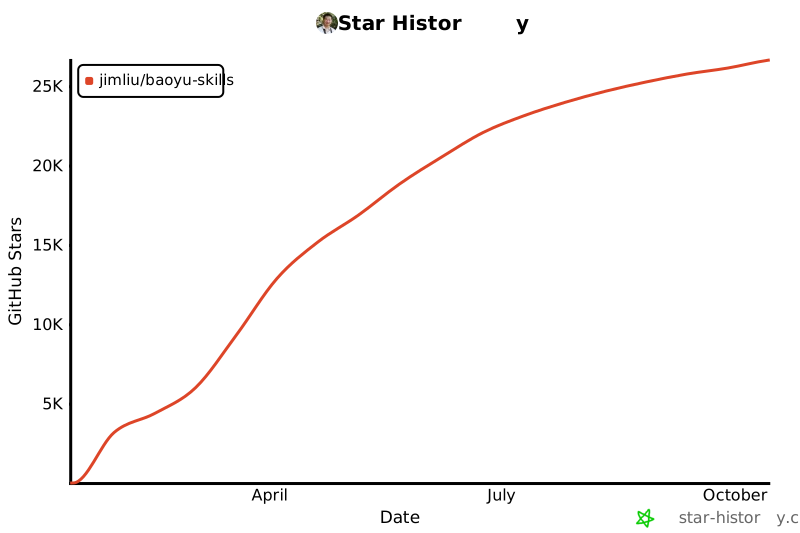
## Star History
|
||
|
||
[](https://www.star-history.com/#JimLiu/baoyu-skills&Date)
|