 bb4f0dc52c
|
||
|---|---|---|
| .claude-plugin | ||
| screenshots | ||
| skills | ||
| .gitignore | ||
| CLAUDE.md | ||
| README.md | ||
| README.zh.md | ||
README.md
baoyu-skills
English | 中文
Skills shared by Baoyu for improving daily work efficiency with Claude Code.
Prerequisites
- Node.js environment installed
- Ability to run
npx buncommands
Installation
Quick Install (Recommended)
npx add-skill jimliu/baoyu-skills
Register as Plugin Marketplace
Run the following command in Claude Code:
/plugin marketplace add jimliu/baoyu-skills
Install Skills
Option 1: Via Browse UI
- Select Browse and install plugins
- Select baoyu-skills
- Select content-skills
- Select Install now
Option 2: Direct Install
/plugin install content-skills@baoyu-skills
Option 3: Ask the Agent
Simply tell Claude Code:
Please install Skills from github.com/JimLiu/baoyu-skills
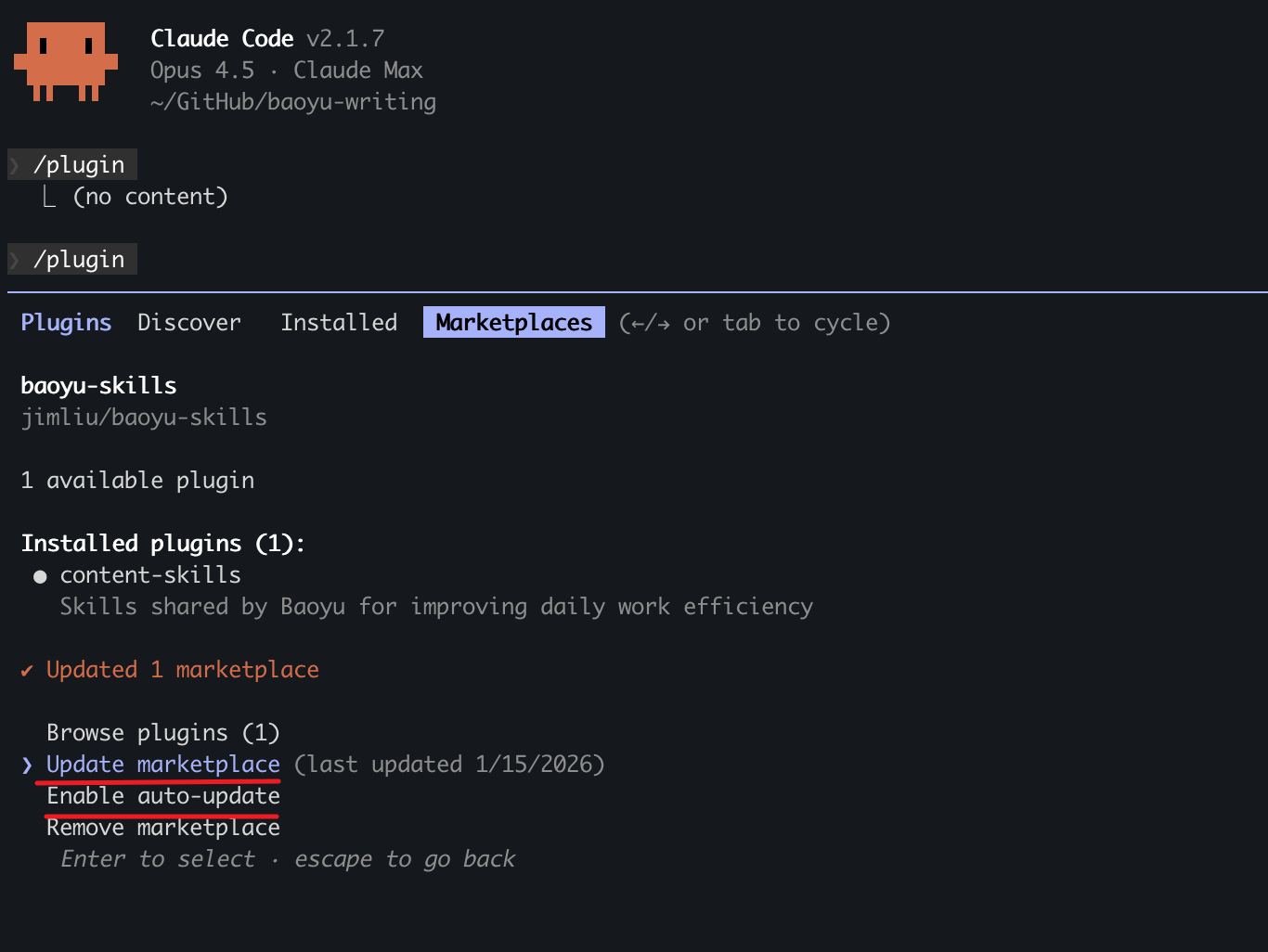
Update Skills
To update skills to the latest version:
- Run
/pluginin Claude Code - Switch to Marketplaces tab (use arrow keys or Tab)
- Select baoyu-skills
- Choose Update marketplace
You can also Enable auto-update to get the latest versions automatically.
Available Skills
baoyu-gemini-web
Interacts with Gemini Web to generate text and images.
Text Generation:
/baoyu-gemini-web "Hello, Gemini"
/baoyu-gemini-web --prompt "Explain quantum computing"
Image Generation:
/baoyu-gemini-web --prompt "A cute cat" --image cat.png
/baoyu-gemini-web --promptfiles system.md content.md --image out.png
baoyu-xhs-images
Xiaohongshu (RedNote) infographic series generator. Breaks down content into 1-10 cartoon-style infographics with Style × Layout two-dimensional system.
# Auto-select style and layout
/baoyu-xhs-images posts/ai-future/article.md

# Specify style
/baoyu-xhs-images posts/ai-future/article.md --style notion

# Specify layout
/baoyu-xhs-images posts/ai-future/article.md --layout dense

# Combine style and layout
/baoyu-xhs-images posts/ai-future/article.md --style tech --layout list

# Direct content input
/baoyu-xhs-images 今日星座运势
Styles (visual aesthetics): cute (default), fresh, tech, warm, bold, minimal, retro, pop, notion
Layouts (information density):
| Layout | Density | Best for |
|---|---|---|
sparse |
1-2 pts | Covers, quotes |
balanced |
3-4 pts | Regular content |
dense |
5-8 pts | Knowledge cards, cheat sheets |
list |
4-7 items | Checklists, rankings |
comparison |
2 sides | Before/after, pros/cons |
flow |
3-6 steps | Processes, timelines |
baoyu-cover-image
Generate hand-drawn style cover images for articles with multiple style options.
# From markdown file (auto-select style)
/baoyu-cover-image path/to/article.md

# Specify a style
/baoyu-cover-image path/to/article.md --style tech
/baoyu-cover-image path/to/article.md --style warm

# Without title text
/baoyu-cover-image path/to/article.md --no-title
Available styles: elegant (default), tech, warm, bold, minimal, playful, nature, retro
baoyu-slide-deck
Generate professional slide deck images from content. Creates comprehensive outlines with style instructions, then generates individual slide images.
# From markdown file
/baoyu-slide-deck path/to/article.md

# With style and audience
/baoyu-slide-deck path/to/article.md --style corporate
/baoyu-slide-deck path/to/article.md --audience executives

# Outline only (no image generation)
/baoyu-slide-deck path/to/article.md --outline-only

# With language
/baoyu-slide-deck path/to/article.md --lang zh
Styles (visual aesthetics):
| Style | Description | Best For |
|---|---|---|
notion (default) |
SaaS dashboard aesthetic with clean data focus, card-based layouts | Product demos, SaaS, productivity tools, B2B |
sketch-notes |
Hand-drawn feel with soft brush strokes, warm off-white background | Educational, tutorials, knowledge sharing |
blueprint |
Technical schematics with grid texture, engineering precision | Architecture, system design, data analysis |
bold-editorial |
High-impact magazine style, bold typography, dark backgrounds | Product launches, marketing, keynotes |
vector-illustration |
Flat vector with black outlines, retro soft colors, toy model aesthetic | Creative proposals, children's content, explainers |
minimal |
Ultra-clean with maximum whitespace, single accent color, zen-like | Executive briefings, keynotes, premium brands |
storytelling |
Cinematic full-bleed visuals, emotional photography | Case studies, narratives, customer journeys |
warm |
Soft gradients, rounded shapes, wellness palette | Lifestyle, wellness, personal development |
corporate |
Navy/gold palette, structured layouts, professional iconography | Investor decks, client proposals, quarterly reports |
playful |
Vibrant coral/teal/yellow, rounded shapes, dynamic layouts | Workshops, training, creative pitches |
After generation, slides are automatically merged into a .pptx file for easy sharing.
baoyu-comic
Knowledge comic creator supporting multiple styles (Logicomix/Ligne Claire, Ohmsha manga guide). Creates original educational comics with detailed panel layouts and sequential image generation.
# From source material
/baoyu-comic posts/turing-story/source.md

# Specify style
/baoyu-comic posts/turing-story/source.md --style dramatic
/baoyu-comic posts/turing-story/source.md --style ohmsha

# Specify layout
/baoyu-comic posts/turing-story/source.md --layout cinematic
/baoyu-comic posts/turing-story/source.md --layout webtoon

# Direct content input
/baoyu-comic "The story of Alan Turing and the birth of computer science"
Styles (visual aesthetics):
| Style | Description | Best For |
|---|---|---|
classic (default) |
Traditional Ligne Claire with clean uniform outlines, flat colors, detailed backgrounds | Biographies, balanced narratives, educational content |
dramatic |
High contrast with heavy shadows, intense expressions, angular compositions | Pivotal discoveries, conflicts, climactic scenes |
warm |
Soft edges, golden tones, cozy interiors with nostalgic feel | Personal stories, childhood scenes, mentorship |
tech |
Precise geometric lines, circuit motifs, neon accents on dark backgrounds | Computing history, AI stories, modern tech |
sepia |
Vintage illustration style with aged paper effect, period-accurate details | Pre-1950s stories, classical science, historical figures |
vibrant |
Energetic lines with weight variation, bright colors, dynamic poses | Science explanations, "aha" moments, young audience |
ohmsha |
Manga guide style with visual metaphors, gadgets, student/mentor dynamic | Technical tutorials, complex concepts (ML, physics) |
realistic |
Full-color realistic manga with digital painting, smooth gradients, accurate proportions | Wine, food, business, lifestyle, professional topics |
Layouts (panel arrangement):
| Layout | Panels/Page | Best for |
|---|---|---|
standard |
4-6 | Dialogue, narrative flow |
cinematic |
2-4 | Dramatic moments, establishing shots |
dense |
6-9 | Technical explanations, timelines |
splash |
1-2 large | Key moments, revelations |
mixed |
3-7 varies | Complex narratives, emotional arcs |
webtoon |
3-5 vertical | Ohmsha tutorials, mobile reading |
baoyu-post-to-wechat
Post content to WeChat Official Account (微信公众号). Two modes available:
Image-Text (图文) - Multiple images with short title/content:
/baoyu-post-to-wechat 图文 --markdown article.md --images ./photos/
/baoyu-post-to-wechat 图文 --markdown article.md --image img1.png --image img2.png --image img3.png
/baoyu-post-to-wechat 图文 --title "标题" --content "内容" --image img1.png --submit
Article (文章) - Full markdown/HTML with rich formatting:
/baoyu-post-to-wechat 文章 --markdown article.md
/baoyu-post-to-wechat 文章 --markdown article.md --theme grace
/baoyu-post-to-wechat 文章 --html article.html
Prerequisites: Google Chrome installed. First run requires QR code login (session preserved).
Disclaimer
baoyu-gemini-web
This skill uses the Gemini Web API (reverse-engineered).
Warning: This project uses unofficial API access via browser cookies. Use at your own risk.
- First run opens Chrome to authenticate with Google
- Cookies are cached for subsequent runs
- No guarantees on API stability or availability
License
MIT